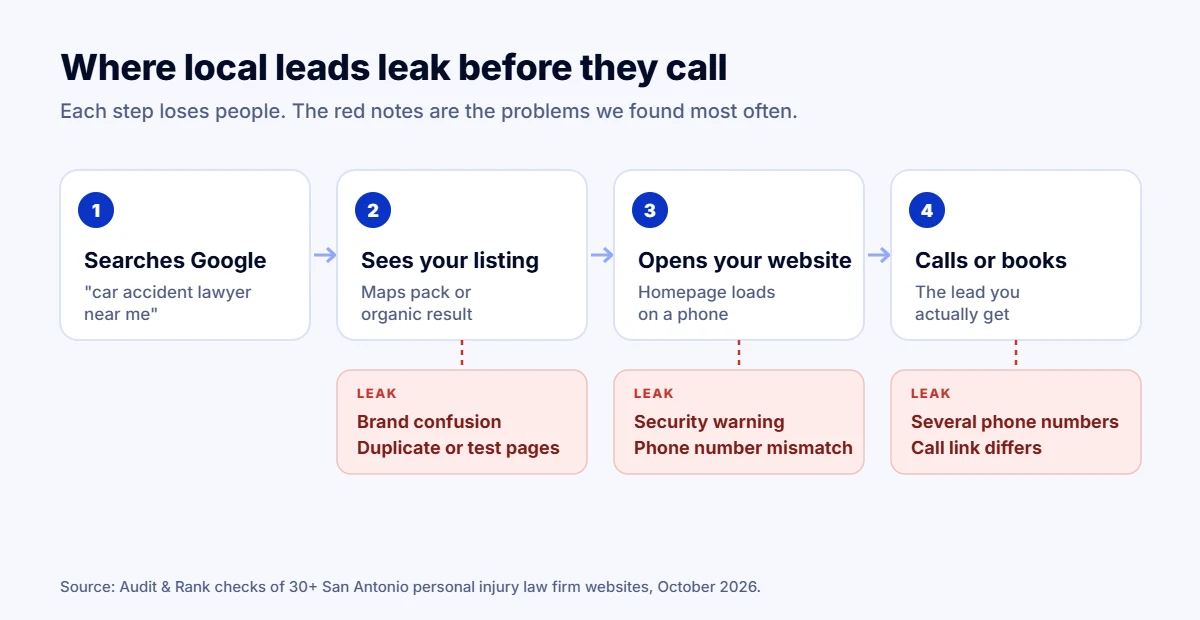
In October 2026 we ran a law firm website SEO check on more than 30 personal injury firm sites in San Antonio, Texas, using the same checks we use in every SEO audit. These are established firms. Many have hundreds of five-star Google reviews. Yet almost every site had at least one problem that quietly holds back its rankings, and most had several.
We are not naming any firm here. The point is the pattern: the same seven law firm website SEO issues came up again and again. If you run a law firm, a clinic or any local business, there is a good chance your site has some of them too.
Key findings
- The most common lead leak was a phone number on the website that did not match the Google Business Profile, or several different numbers on one homepage.
- Very few firms used LegalService or LocalBusiness schema, even though most already had an SEO plugin installed.
- Several sites had test pages, staging copies or duplicate URLs showing in search results.
- Many homepage titles were close to 100 characters and stuffed with keywords, so Google cut them off.
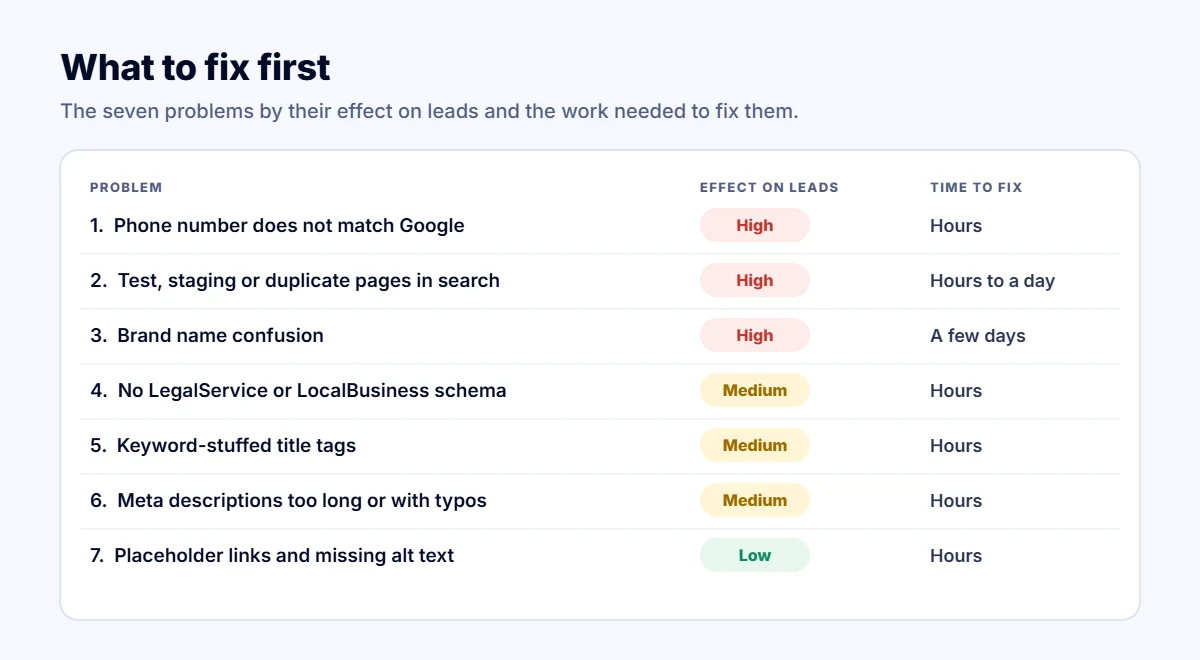
- Most of these fixes take hours, not months, and protect rankings the firm has already paid for.
1. Title tags stuffed with keywords
Several homepages had titles close to 100 characters, repeating phrases like “San Antonio personal injury lawyer” two or three times. Google shows roughly the first 60 characters, so the rest is cut off, and repetition reads as spam to both people and search engines.
Fix: one clear title under 60 characters with the main service, the city and the firm name. For example: “Car Accident Lawyer in San Antonio | Firm Name”.
2. Meta descriptions that are too long or full of typos
We found descriptions from 180 to more than 450 characters, and one with spelling mistakes in the first sentence. The meta description is often the first thing a potential client reads in Google. A cut-off or misspelled snippet lowers clicks, even when the firm ranks well.
Fix: 140 to 160 characters, written like an ad: who you help, what makes you different, and a reason to call today.
3. The phone number on Google does not match the website
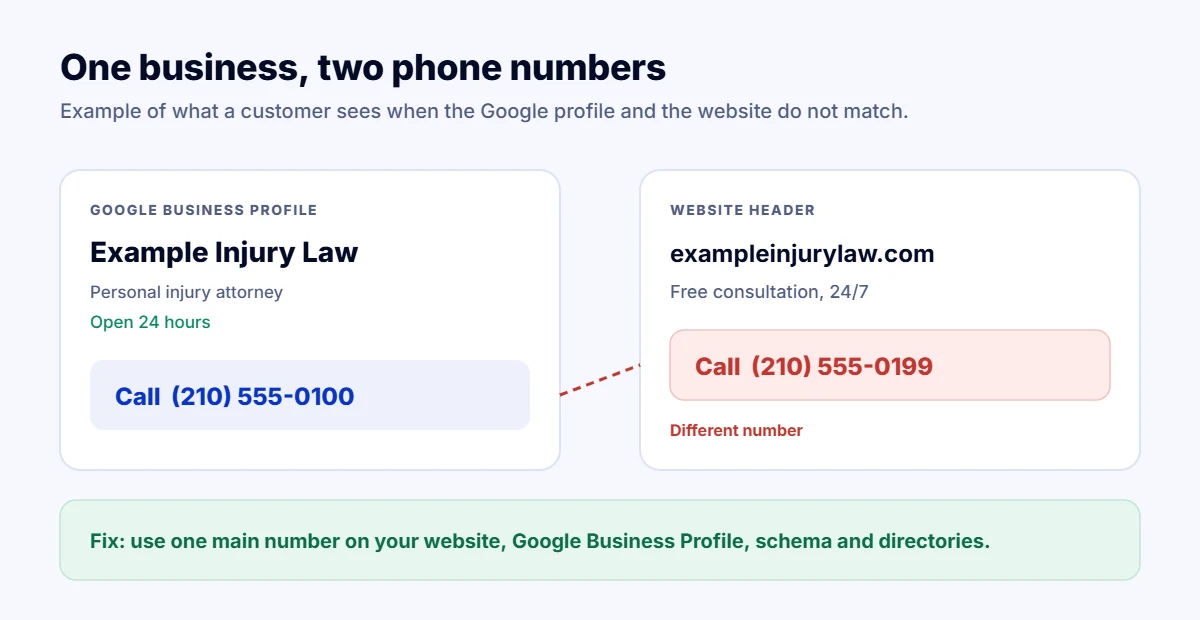
This was one of the most common problems. The number on the Google Business Profile did not appear on the homepage, or the homepage showed three different numbers. In one case the visible number and the click-to-call number were different. Google uses name, address and phone (NAP) consistency as a trust signal for the map pack, and callers get confused too.
Fix: pick one main number per office and use it everywhere: website header and footer, Google Business Profile, directories and social profiles. If you use call tracking, keep the main number in your schema and listings.
4. No local business schema
Most sites had some structured data, usually added by an SEO plugin, but very few described the firm as a LegalService or LocalBusiness with its address, phone, opening hours and practice areas. Without it, Google has to guess what the business is and where it operates. Schema is also one of the signals AI search tools use to understand a business.
Fix: add LegalService (or the right LocalBusiness type) schema on the homepage and each office page, with the same NAP details as your Google profile.
5. Duplicate, test and staging pages showing in search
We found a test page left live and indexed, ugly ?p=12345 versions of pages appearing in search results, URLs ending in “-3” from pages that were copied several times, and even a full staging copy of a firm’s website appearing in results for its main keyword. Each of these splits ranking signals between two or more versions of the same content.
Fix: delete or noindex test pages, password-protect staging sites, set correct canonical tags, and redirect old duplicates to the main page. Then check the “Pages” report in Google Search Console.
6. Unfinished details: placeholder links and missing alt text
Many homepages had five or more menu or footer links pointing to “#”, meaning they go nowhere. Others had 30 to 40 percent of images with no alt text. One even had pinch-zoom disabled on mobile, which hurts accessibility. None of these alone will sink a site, but together they tell Google and visitors that the site is not well maintained.
Fix: crawl your site once a quarter, fix every empty link, describe every meaningful image, and let mobile users zoom.
7. Brand confusion
Some firms used three different names across the same homepage and their metadata. In one case, searching for an attorney’s own name returned another law firm’s profile page about him instead of his own firm’s website. When Google is unsure which name belongs to which business, branded searches, the easiest searches to win, go to someone else.
Fix: one official firm name everywhere, an About page and attorney pages on your own domain, and Organization schema with links to your official social profiles.
Bonus: problems we found on older listings
- Broken SSL certificates, so browsers show a security warning before the page even loads.
- Dead domains still listed in online directories, sending potential clients nowhere.
- Homepages returning a 404 error while the business is still active.
Why this matters more for law firms
Law firm website SEO is one of the fastest ways to protect those rankings, and a single personal injury case can be worth tens of thousands of dollars in fees. Losing a few positions in the map pack or the top organic results means losing calls to the firm one spot above. Most of the fixes above take hours, not months, and they protect rankings you have already paid for with content, links and reviews.
Check your own site
- Search your firm name on Google and check that your own site and Google Business Profile come first.
- Compare the phone number on your Google profile with your homepage, or run our free Lead Leak Checker to spot it automatically.
- Open Google Search Console, go to Pages, and look for test, staging or duplicate URLs.
- Export your Performance report and run it through our free Search Console Analyzer to see which pages are losing clicks.
How we did this research
In October 2026 we listed personal injury law firms in San Antonio from Google Maps and OpenStreetMap, then checked each firm’s homepage, as part of this law firm website SEO review, with the same automated checks our Lead Leak Checker uses: security, mobile settings, phone numbers, schema, titles, descriptions, headings and sitemaps. We then reviewed the sites by hand and looked at how each firm appeared in search results. We do not name any firm, and the problems above are patterns, not scores of individual businesses.
Frequently asked questions
What is the most common SEO problem on law firm websites?
In our checks it was inconsistent phone numbers: the number on the Google Business Profile did not appear on the website, or the homepage showed several different numbers. This splits calls and weakens map pack rankings.
Does a law firm need schema markup?
Yes. LegalService or LocalBusiness schema tells Google and AI search tools what the firm does, where it is, its hours and its phone number. It should match the Google Business Profile exactly.
How long do these fixes take?
Most of the issues in this article take a few hours to fix. Ranking and lead improvements usually show within a few weeks, once Google recrawls the pages.
How can I check my own law firm website?
Run your homepage through our free Lead Leak Checker. Add the phone number from your Google Business Profile to check whether it matches your site.
Want us to handle your law firm website SEO? Send your website and we will reply with a free quick check and a prioritised fix list, usually within one working day. Get a free SEO audit.