Category: Local SEO

Local SEO guides and original research: Google Business Profile, map pack rankings and getting more calls and leads.

  • Dental Local SEO: How Clinics Get More Patients From Google

    Dental Local SEO: How Clinics Get More Patients From Google

    Dental local SEO is the work that helps a clinic appear on Google Maps and in local search results when a patient looks for a dentist nearby. A patient with a toothache, a chipped tooth or a wish for a cleaner smile usually searches from a phone, and the first few results decide which clinic gets the call. This guide explains how that search works and walks through six steps a clinic can take, whether you run one clinic or several.

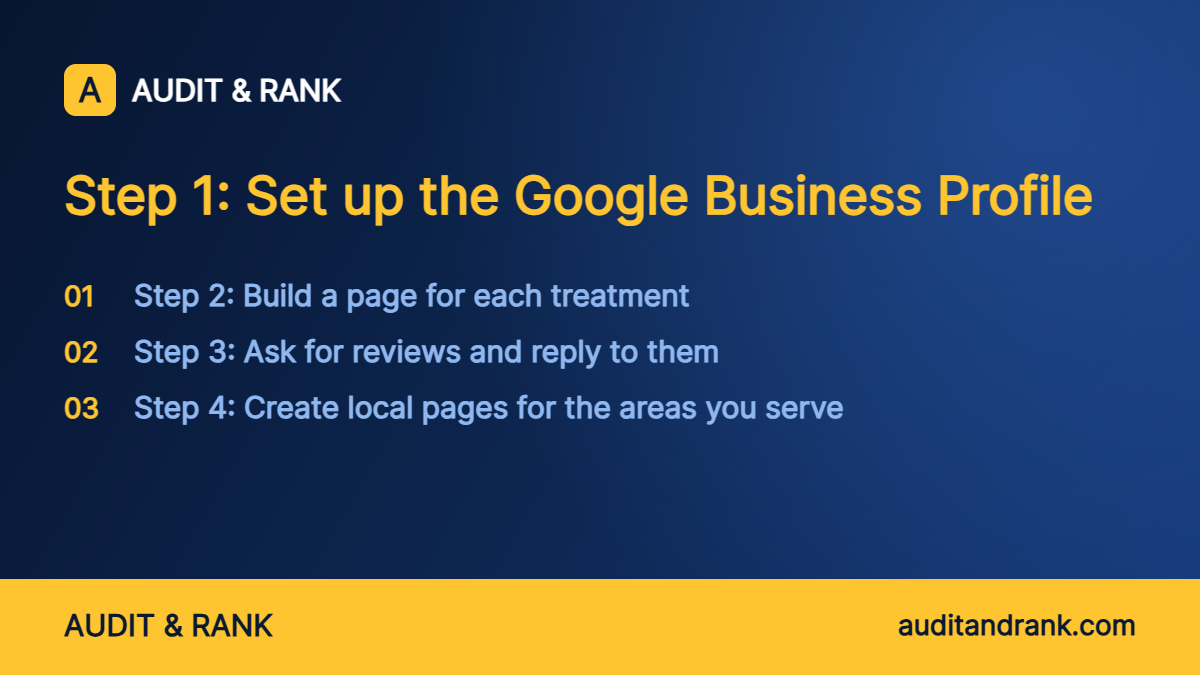
    The six steps, in the order we usually work through them:

    1. Set up the Google Business Profile
    2. Build a page for each treatment
    3. Ask for reviews and reply to them
    4. Create local pages for the areas you serve
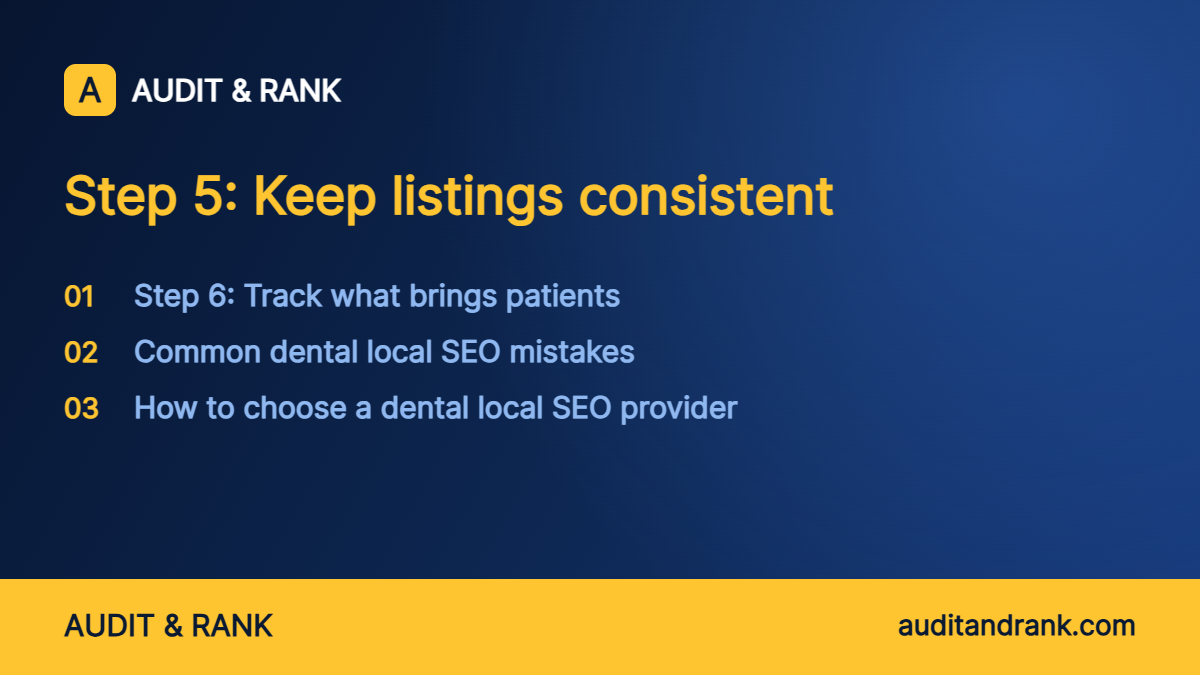
    5. Keep listings consistent
    6. Track what brings patients

    What is dental local SEO?

    Dental local SEO is the set of profile, page and review work that makes a clinic easy to find for searches with a place in them, such as “dentist near me”, “emergency dentist in [city]” or “teeth whitening [area]”. It combines the Google Business Profile, the clinic website, patient reviews and the listings on other directories.

    Google says local results are based mainly on three things: relevance, distance and prominence. Relevance is how well the profile matches the search. Distance is how far the clinic is from the patient. Prominence is how well known and trusted the clinic looks, and reviews, links and directory listings all feed into it. A clinic cannot move closer to a patient, so the work focuses on the other two.

    Unlike a general SEO project, dental local SEO depends on the place. A clinic in a large city competes with many other clinics, while a clinic in a smaller town may only need to beat a few. The plan is shaped around the area the clinic actually serves.

    How patients search for a dentist

    Dental searches fall into two groups. Emergency searches are urgent: a broken tooth, severe pain or a lost filling. Planned searches are slower: a cleaning, a check-up, implants, braces or cosmetic work. Both are local, and both need their own answer on the page.

    Patients tend to look at the map results first, then the reviews, then the website. A clinic that appears for only one group of searches loses patients from the other, so the profile and the website should cover urgent care and planned treatment.
    Graphic summarising: Step 1: Set up the Google Business Profile

    Step 1: Set up the Google Business Profile

    The Google Business Profile is usually the first thing a patient sees, so it comes first. Google’s own help pages say customers are 2.7 times more likely to consider a business reputable when they find a complete profile on Search and Maps. These are the parts to get right:

    • Categories: choose “Dentist” as the primary category. Google’s profile guidelines advise choosing the fewest categories that describe the core business, so add a secondary one, such as cosmetic dentist or emergency dental service, only when the clinic really offers that service.
    • Name, address and phone: use the clinic’s real-world name, and keep the address, phone number and opening hours exactly as they appear on the website. Adding keywords to the business name goes against Google’s guidelines and can lead to the profile being edited or suspended.
    • Services and booking link: list each treatment the clinic offers, and point the booking button to a page where a patient can actually book.
    • Photos: add photos of the clinic, the team and the treatment rooms, and keep adding new ones.
    • Updates: post about a service, an offer or a seasonal reminder at a steady rhythm rather than in bursts.

    Step 2: Build a page for each treatment

    Each main treatment needs its own page. A page for dental implants should explain who the treatment suits, how long the appointment takes, what the next step is and how to book. A single general services page is less likely to rank for the specific searches that bring patients.

    Add the details patients ask before they call: the languages spoken, the payment options, the insurance accepted and how to reach the clinic. Show the clinic name, address and phone number on the page in the same format used on the profile, and link related treatments to each other.

    A schema markup block (the LocalBusiness or Dentist type) helps search systems read those details, and our free schema generator can build it. If you would rather have the pages planned and written for you, that is part of our dental local SEO service.

    Step 3: Ask for reviews and reply to them

    Reviews feed prominence, and Google confirms that review count and score factor into local ranking. Ask each patient for a review after treatment, using the direct review link from the profile. Google does not allow reviews in exchange for discounts or gifts, so never offer one. The Business Profile policies list what is restricted.

    Replies matter as well. Keep them short, polite and general. Do not confirm that the reviewer is a patient or mention treatment details, because privacy rules for health providers in many countries can restrict this even when the reviewer shared the details first. Answer negative reviews calmly, invite the person to continue the conversation offline, and report any review that breaks Google’s policies. Our review management service covers this for clinics that want it handled.

    Step 4: Create local pages for the areas you serve

    If a clinic serves several neighbourhoods or nearby towns, each area can have a page with real local detail: how to reach the clinic, parking, public transport and the treatments most often needed there. A page that only swaps the area name is weak and rarely ranks, so add real information or do not create the page. Build pages only for areas the clinic genuinely serves.
    Graphic summarising: Step 5: Keep listings consistent

    Step 5: Keep listings consistent

    The clinic name, address and phone number should match across the website, the Google profile and every directory where the clinic is listed. Small differences, such as “Street” in one place and “St.” in another, can confuse search systems and weaken trust. Create one reference sheet with the exact details and check every listing against it.

    Duplicate listings and old addresses from a previous office can split the local signal, and Google asks for only one profile per business. Find them, request removals or merges, and keep a log of each change. Our local citation service handles this work.

    Step 6: Track what brings patients

    Track calls from the profile and the website, form bookings, requests for directions and clicks on the booking button. These numbers show which pages and profile actions bring patients, so the next round of work goes where it earns the most. If the clinic uses a call tracking number, keep the main clinic number as the primary number on the profile and keep the details on the website consistent.

    A monthly summary in plain language is more useful than a list of rankings. It should show the actions taken, the results and the next steps. If you are not sure where calls are being lost, our free Lead Leak Checker is a quick place to start.

    Common dental local SEO mistakes

    • One general services page for every treatment.
    • The wrong category, or too many categories, on the profile.
    • Keywords added to the business name.
    • Reviews that are never requested, or replies that reveal patient details.
    • Different phone numbers or addresses across listings.
    • Publishing before-and-after photos, offers or testimonials without checking the local dental advertising rules.

    Each one is simple to fix, and fixing them is a sensible first step before spending more on advertising.

    How to choose a dental local SEO provider

    Ask what work is included each month, how many treatment pages will be created or improved, and how calls and bookings will be tracked. Be careful with any provider that promises a guaranteed first place, because no honest provider can guarantee a ranking.

    If you want to compare prices before you talk to us, our dental SEO cost page shows what each package includes and what affects the price.

    Frequently asked questions about dental local SEO

    How long does dental local SEO take to work?

    Profile changes can show within weeks. Stronger results usually take two to three months, depending on competition and the starting point of the clinic.

    Do I need reviews for dental local SEO?

    Yes. Google counts review volume and rating as part of local ranking, and a steady flow of recent reviews also helps patients trust the clinic before they call.

    What is the difference between dental SEO and dental local SEO?

    Dental SEO covers how a clinic website ranks in search in general. Dental local SEO focuses on Google Maps and on searches that include a place, such as “dentist near me”, and relies on the Google Business Profile, reviews and consistent listings.

    How much does dental local SEO cost?

    The price depends on the competition in your area, how many treatment pages are needed and what work is included each month. Our dental SEO cost page explains what affects it.

    Can a clinic in any country use this approach?

    Yes. The method is the same. The area, the language and the competition are different, so the plan is adjusted for each clinic.

    Want a plan for your dental clinic?

    Send us your city and main treatments. We reply with a clear plan and a fixed price.

    Get a free dental SEO check
  • Free Local SEO Audit: What to Check Before You Pay Anyone

    Free Local SEO Audit: What to Check Before You Pay Anyone

    A free local SEO audit lets you check the basics yourself in about 30 minutes, before you pay for any local SEO work. It covers the things that decide whether people find your business and call it.

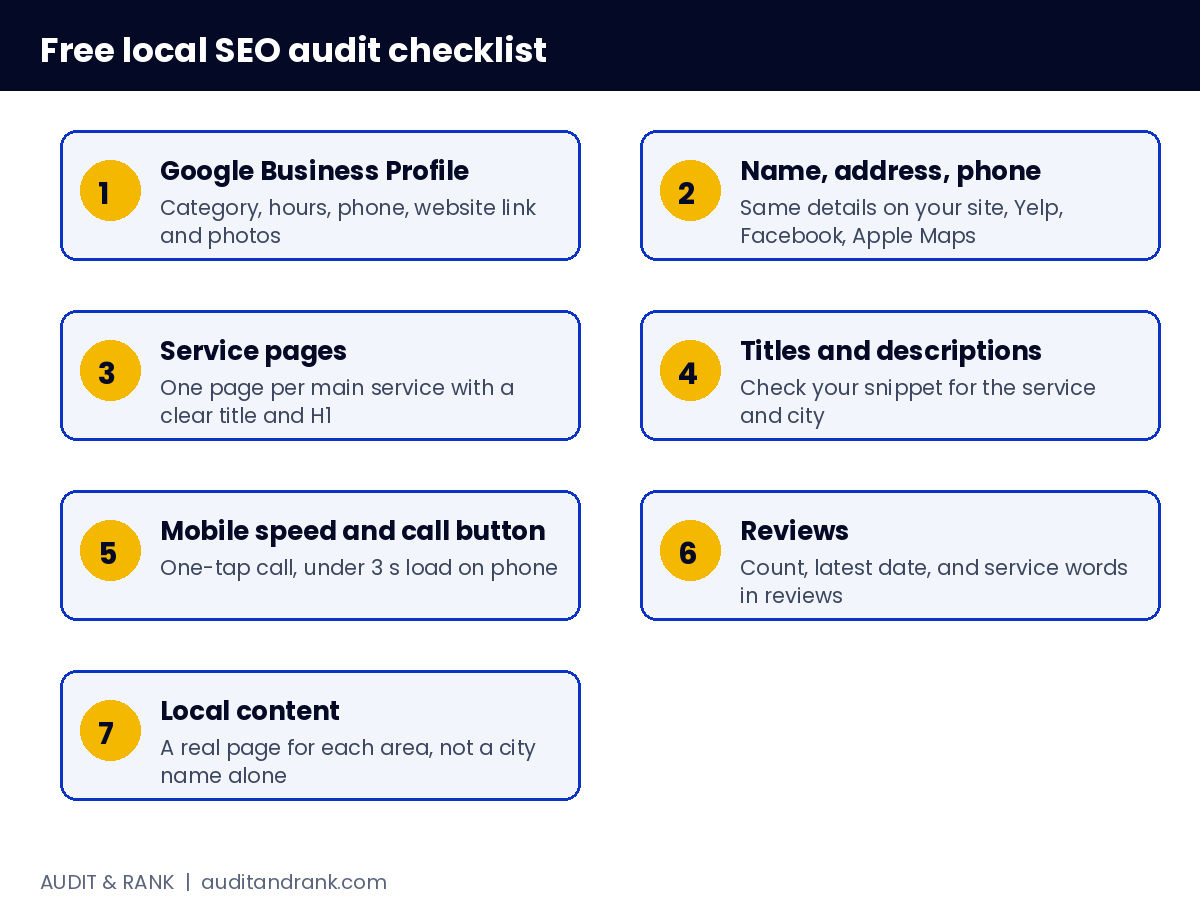
    Free local SEO audit checklist diagram

    Use this free local SEO audit as a checklist. Each step tells you what to look for and why it matters.

    1. Google Business Profile

    • The primary category is the most specific one for your main service
    • Hours, phone number and website link are correct
    • You have at least 10 photos of real work, updated in the last 3 months
    • Reviews are answered, including the bad ones

    A profile with the wrong category or missing details gives Google less to match to a search, which can hurt your place in the Map Pack. Google says local results are based mainly on relevance, distance and prominence, and its profile guidelines ask you to choose the fewest categories that describe your core business.

    2. Name, address and phone consistency

    Search your business on 5 directories: your own site, Yelp, Facebook, Apple Maps and one local directory. The name, address and phone should match exactly. Small differences like “St” and “Street” can split your trust signals.

    3. Service pages

    Check your homepage and service pages. Each main service should have its own page with a clear title and H1, for example “Water Heater Repair in [Your City]”. A single “services” page cannot rank for every service you offer.

    4. Titles and descriptions

    Search for your main service and your city. Look at your page title and description in the results. Is the service in the title? Does the description give a reason to click? You can preview both before you publish with our free SERP checker.

    5. Mobile speed and the call button

    Open your site on a phone. Can you call the business in one tap? Does the page load in under 3 seconds? Slow pages and hidden phone numbers lose calls even when the rankings are good.

    6. Reviews

    Count your reviews and check the date of the latest one. A business with no new reviews in 3 months looks less active. Ask recent customers for a review in their own words. Reviews that naturally name the service and the area help future customers more than a generic rating.

    7. Local content

    Do you have a page or post for each area you serve? Thin pages with only a city name rarely rank. Each page needs real details about the area and the service there.

    Common mistakes in a free local SEO audit

    • Checking only the homepage. Most local leads come from service and city pages. Check at least one page for each main service.
    • Ignoring the mobile view. Most local searches happen on phones. Check the page on your phone, not only on a laptop.
    • Trusting your own search results. Google personalises results by location and history. Use an incognito window and search from a location near your customers, or check the performance data in your Business Profile instead.
    • Counting reviews only by number. A review that names the service and area is more useful than a generic five-star rating.

    Free tools that help with the check

    You do not need paid software to start a free local SEO audit. Google Search Console shows which queries bring clicks. The performance data in your Google Business Profile shows calls and direction requests. PageSpeed Insights shows how fast a page loads on mobile. A free SERP preview shows how your title and description will look before you publish them.

    How to track progress over 90 days

    Write down your baseline today: number of profile photos, number of reviews, the title of your main service page, and the number of calls last month. Repeat the same free local SEO audit every 30 days. Changes in these numbers show whether your work is moving the business, even before rankings change.

    Small wins count. A new photo set, a clearer service title or a faster mobile page can change the number of calls within weeks, while rankings for competitive terms can take months.

    What a paid local SEO audit should add

    A free local SEO audit finds the basics. A paid audit should add:

    • Your real Search Console and Analytics data, not guesses
    • Your competitors in the Map Pack and what they do better
    • Problems listed with their impact on calls and enquiries
    • A priority order, so you know what to fix first

    If you want that check, see our SEO audit service. For local business pages, read our local SEO for home services guide.

    How to know if a local page is working

    A local service page is working when it gets calls or form enquiries, not only impressions. Look at three signals: the number of people who view the page from your target area, the share of visitors who tap the phone number or submit the form, and the number of jobs that come from those visitors. If the page gets views but no actions, check the first screen on a phone. The phone number, the service and the area should be visible without scrolling.

    Simple free local SEO audit checks you can repeat monthly

    1. Search your main service and city and note your position in the Map Pack.
    2. Check that your profile has the same name, address and phone as your website.
    3. Count the new reviews and reply to each one within two days.
    4. Check that your service pages still load quickly on a phone.

    FAQ

    Is a free local SEO audit enough?

    It finds the basics. It cannot show your real data or competitor details, so use it as a starting point.

    How often should I run a free local SEO audit?

    Every 3 months is a good routine, and after any big change to your website or profile.

    What should I fix first?

    Google Business Profile category, phone visibility on mobile, and the service page title for your main service. These usually bring the fastest change.

  • How Water Damage Restoration Companies Rank for Emergency Searches (Local SEO Guide)

    How Water Damage Restoration Companies Rank for Emergency Searches (Local SEO Guide)

    A burst pipe at 2 a.m. creates an emergency water damage search that is urgent, local and ready to buy. “Water damage restoration near me” and “emergency water extraction” are searched by people who will call the first company that answers. That is why this niche is one of the most valuable in local SEO.

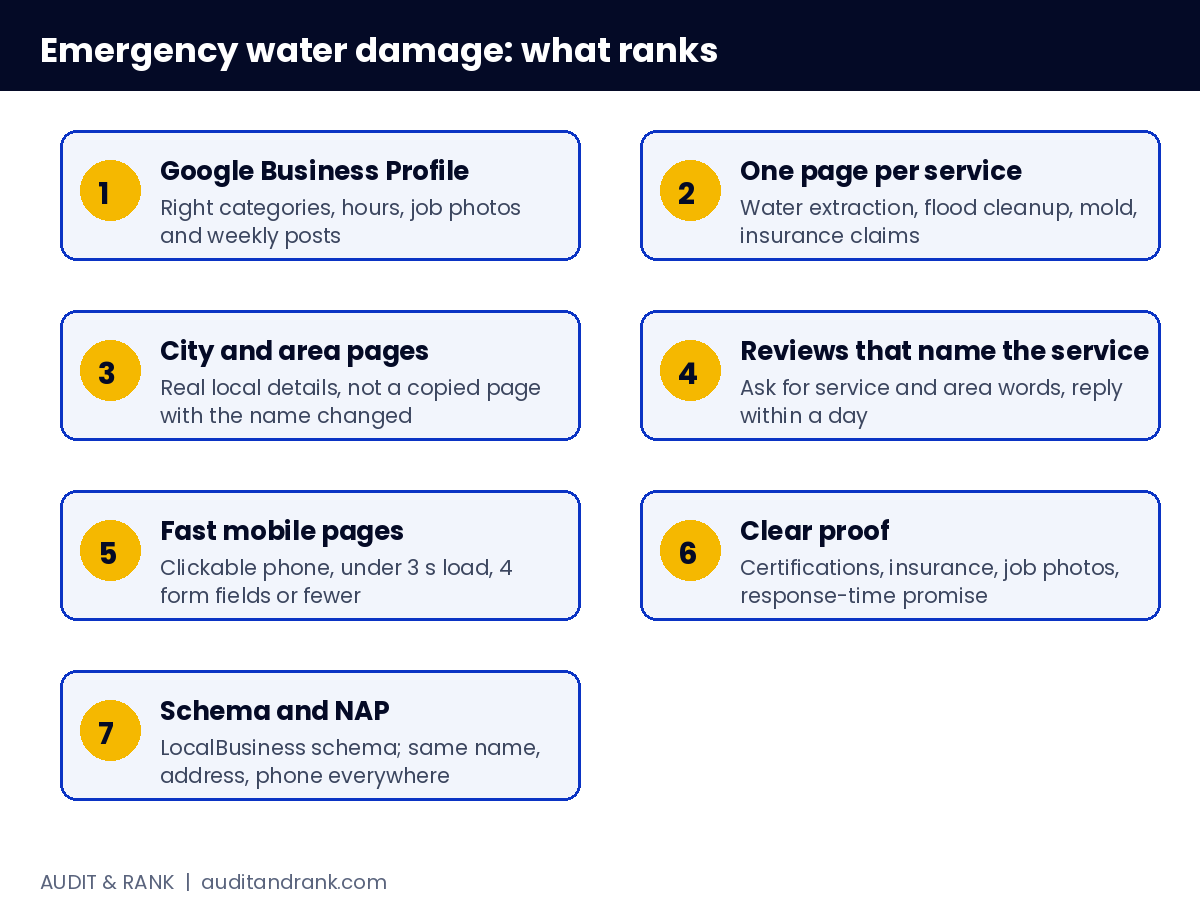
    Emergency water damage SEO diagram

    This guide explains how restoration companies rank for emergency water damage searches and what you can copy for your own business.

    Why emergency water damage searches are different

    Emergency water damage searches often show the Map Pack first. Google wants a business that is open now, close to the searcher and has reviews that show it answers fast. Organic results come second. A restoration company that only has a homepage will struggle against companies with a Business Profile, service pages and city pages.

    1. Google Business Profile comes first

    Your profile must show the correct service categories (water damage restoration, mold remediation, emergency service), accurate hours, and photos of real jobs. Mention 24-hour emergency service in the description and keep the main phone number correct in the phone field. Post an update each week about a job or a tip. Google’s own help pages say customers are 2.7 times more likely to consider a business reputable when they find a complete profile.

    2. One service page per service

    Make a separate page for water extraction, flood cleanup, mold after water damage and insurance claims. Each page should say the service, the area, the response time and the next step. A single “services” page cannot rank for all of these terms.

    3. City and neighbourhood pages

    Emergency water damage searches are local. Create one page for each town or area you cover. Each page needs real details: the neighbourhoods served, local landmarks you know, and the typical response time there. Copy-pasted city pages with only the name changed are a quality risk.

    Emergency water damage reviews that name the service and area

    4. Reviews that name the service

    Ask customers for a review in their own words. Genuine reviews that mention the service and the area, for example “water extraction in Dallas after a pipe burst”, can help the profile show for those words. Do not write the review for the customer or offer a reward, and reply to every review within a day.

    5. Fast, mobile-first pages

    Emergency visitors are on phones. The phone number must be clickable at the top, the page must load in under 3 seconds on mobile, and the form must have 4 fields or fewer. Slow or cluttered pages lose the call even when they rank.

    6. Clear proof on the page

    Show certifications (IICRC or similar), insurance details, photos of completed jobs and a response-time promise. Visitors in a crisis trust clear proof more than long text.

    7. Schema and consistent NAP

    Add LocalBusiness schema with your address, phone, hours and service area (our free schema generator can build it). Make sure the name, address and phone are the same on your site, your profile and directories. Mismatches reduce trust for local ranking.

    Plan your service areas before you build pages

    Make a simple list with three columns: the town or neighbourhood, the drive time from your base, and the number of jobs you did there in the last year. Build city pages first for the areas with the most jobs and the shortest response time. Do not promise a service area you cannot reach within the response time you advertise, because reviews will show the gap quickly.

    Target insurance-related searches carefully

    Many emergency water damage customers search for help with an insurance claim, for example “water damage insurance claim help” or “flood damage claim adjuster”. These searches bring high-value leads, but the page must be honest. Explain what you can document, such as moisture readings, photos and a drying log, and say clearly that the insurer makes the final decision. Never promise a claim will be approved.

    Track calls and forms, not only rankings

    A ranking is only useful when it brings enquiries. Track three numbers every month:

    • Calls from the Business Profile. Check the Performance section for calls and direction requests.
    • Form submissions by page. Find out which service or city page brings the most enquiries.
    • Jobs booked from each source. Ask every caller how they found you. This shows which pages and profile actions turn into real work.

    Compare these numbers every 30 days. If a page ranks well but brings no calls, the problem is usually the page itself: a slow load, a hidden phone number or a form with too many fields.

    Common mistakes in emergency water damage SEO

    • Copied city pages. The same paragraph with a different town name is easy for Google to recognise and easy for visitors to ignore.
    • No response time on the page. In an emergency, the first question is how fast someone will arrive. Put the promise above the fold.
    • Old photos. Profiles with photos from years ago look inactive. Upload new job photos each month.
    • Inconsistent business names. Using “ABC Restoration LLC” on one site and “ABC Restoration” on another weakens local trust.

    What to copy this week

    1. Check your profile categories and hours.
    2. Make the phone number clickable on mobile.
    3. Choose one service and one city page to build first.
    4. Ask your last five customers for a review in their own words.

    If you want a check of your current emergency water damage pages, see our local SEO for home services guide. For how your title and description look in Google before you publish, use our free SERP checker.

    Sample weekly routine for a restoration business

    Monday: Reply to every new review from the weekend and check the Business Profile for missed calls.

    Wednesday: Upload two or three photos from completed jobs, with the service and area in the file name and caption. Keep the photos honest and free of customer details.

    Friday: Check the calls and form submissions for the week. Note which page the most recent enquiries came from. If a page brings enquiries, add one more internal link to it from a related page.

    Monthly: Review the top 10 pages in Search Console and update any title or first paragraph that has lost clicks. Add one new service or area page if the calls show demand there.

    A routine like this keeps the profile active and gives Google fresh signals without a large budget.

    FAQ

    Is emergency water damage SEO worth it?

    Yes, for many companies, because each job is high value and urgent. Even a few extra calls per month can help cover the cost of the work.

    How long until emergency water damage pages rank?

    Local pages with a complete profile can start showing within weeks. Organic rankings for competitive cities usually take 3 to 6 months.

    Should I use Google Ads too?

    Ads can bring calls fast while your organic pages build up. Track both so you know which one brings the jobs.

  • Lead Generation for Contractors: Shared Leads vs Exclusive Leads vs Local SEO (2026)

    Lead Generation for Contractors: Shared Leads vs Exclusive Leads vs Local SEO (2026)

    Lead generation for contractors comes down to one question: which source brings you customers who actually book? Every contractor wants more leads, but not every lead is worth the same. A lead sent to five companies at once is very different from a homeowner who found only you on Google Maps. This guide to lead generation for contractors compares the main sources in 2026 (shared lead marketplaces, exclusive lead services, Local Services Ads, Google Ads, local SEO and referrals) so you can decide where your money and time should go. Each section starts with a short answer.

    Key points

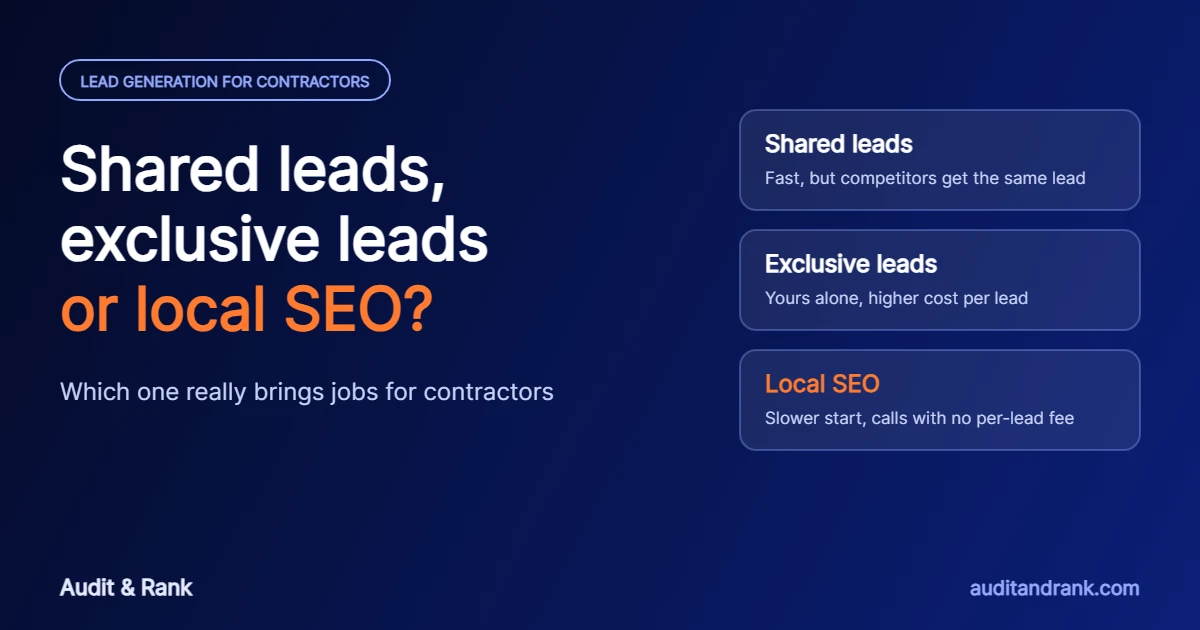
    • Shared leads are fast but often sold to several contractors, so speed decides who wins the job.
    • Exclusive leads and Local Services Ads cost more per lead, but you are not racing competitors for the same customer.
    • Local SEO takes months to build, then brings calls without a fee for each lead.
    • The best lead generation for contractors is measured by cost per booked job, not cost per lead.
    • Most jobs are lost after the lead arrives: missed calls, slow replies and no follow-up.

    What is lead generation for contractors?

    Short answer: lead generation for contractors is any system that brings you homeowners or businesses who need your service and are ready to ask for a quote.

    For plumbers, roofers, HVAC companies, remodelers and general contractors, a lead is a phone call, a form, a message or a quote request. Good lead generation for contractors is not about the number of leads. It is about how many of them become booked jobs, and what each booked job costs you.

    What are the main types of lead generation for contractors?

    Short answer: six main sources: lead marketplaces, exclusive lead services, Local Services Ads, Google Ads, local SEO and referrals.

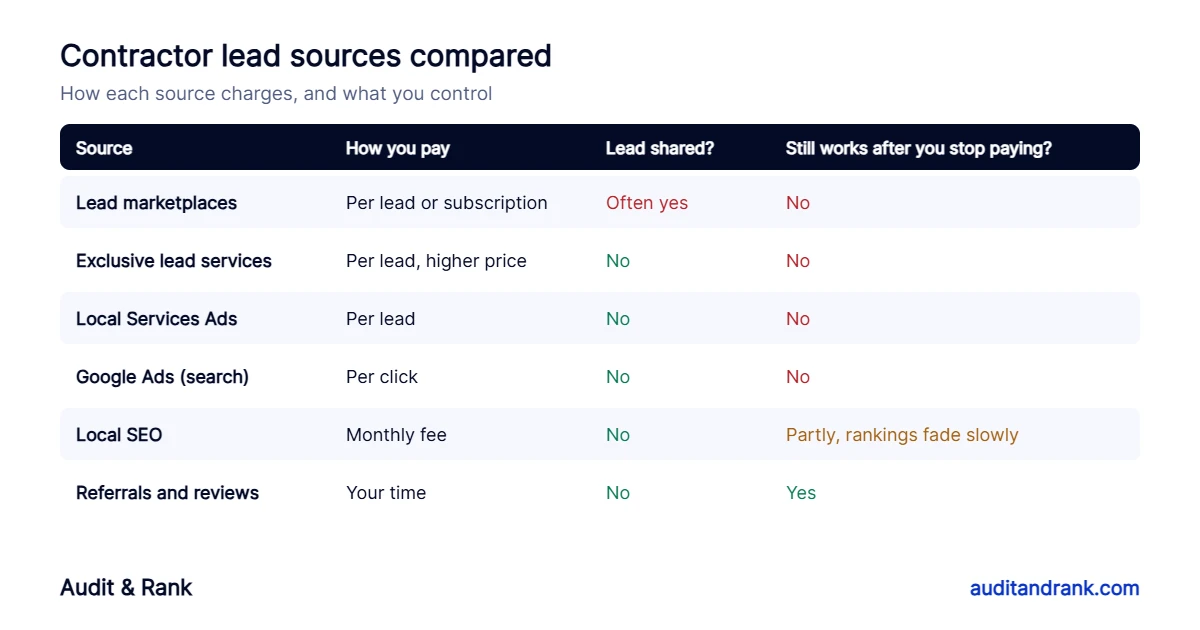
    Lead generation for contractors compared: lead marketplaces, exclusive leads, Local Services Ads, Google Ads, local SEO and referrals
    How each lead source charges, whether the lead is shared, and what keeps working after you stop paying.
    • Lead marketplaces such as Angi, HomeAdvisor and Thumbtack match homeowners with pros. Depending on the platform and plan, the same request can go to several contractors.
    • Exclusive lead services sell each lead to one contractor only, usually at a higher price per lead.
    • Local Services Ads appear at the top of Google with a Google Screened or Google Guaranteed badge, and you pay per lead.
    • Google Ads charge per click on your ad, whether or not the visitor calls.
    • Local SEO earns your place in the map pack and organic results through your profile, website and reviews.
    • Referrals and repeat customers cost time and good work, and usually close best.

    Shared leads vs exclusive leads: what is the difference?

    Short answer: a shared lead can be sent to several contractors at once; an exclusive lead goes only to you.

    With shared leads, the homeowner may get calls from three or four companies within minutes. The contractor who replies first and sounds most trustworthy usually wins, and the others paid for a lead that went nowhere. Exclusive leads cost more each, but you are not in a race. That is why many contractors find that exclusive sources give a lower cost per booked job, even when the cost per lead is higher. In lead generation for contractors, the price of a lead matters far less than the price of a job.

    Are lead sites like Angi and HomeAdvisor worth it?

    Short answer: they can help when you need work quickly, but they work best as a top-up, not as your main source.

    Lead marketplaces bring volume fast and handle the advertising for you, which makes them a quick option for lead generation for contractors who are short on work. The trade-offs are that you do not own the customer relationship, lead quality varies, and you have to respond very quickly to win shared leads. If you use them, track every lead in a simple sheet: date, source, cost, whether you reached the customer, and whether it became a job. After a month or two you will know your real cost per booked job.

    How do Local Services Ads work for contractors?

    Short answer: you pay for leads that come through your ad, not for clicks, and the ad shows Google’s badge at the top of the results.

    To appear, your business goes through Google’s screening for your trade. Your ranking inside Local Services Ads depends on factors such as your reviews, how quickly you respond and your budget. You can dispute leads that are clearly not valid. They are a strong lead generation for contractors option for urgent trades like plumbing, HVAC and electrical work, but the cost per lead rises in competitive cities and the calls stop when the budget runs out.

    How does local SEO compare on cost per lead?

    Short answer: local SEO costs a monthly fee instead of a fee per lead, so the cost of each call usually falls as your rankings grow.

    Local SEO is the best long-term lead generation for contractors strategy, but it is slower to start. It means optimizing your Google Business Profile, building a page for each main job on your website, collecting reviews and fixing your directory listings. Once you rank in the map pack for your main jobs, the calls keep coming without a fee for each one, and rankings fade slowly rather than stopping overnight. Read our complete guide to local SEO for home service businesses for the full process.

    Which lead generation for contractors source is right for my business?

    Short answer: it depends on how fast you need work and how much you can invest in building your own lead flow.

    • Need jobs this month: Local Services Ads or a small Google Ads budget, plus fast follow-up on every lead.
    • New business with no reviews: lead marketplaces can help you get first jobs and reviews, while you set up your Google Business Profile.
    • Established business that wants to stop paying per lead: invest in local SEO and reviews, and reduce paid sources as calls grow.
    • High-value jobs such as roofing and remodeling: focus on exclusive sources and strong project pages with real photos.

    How do I turn more leads into booked jobs?

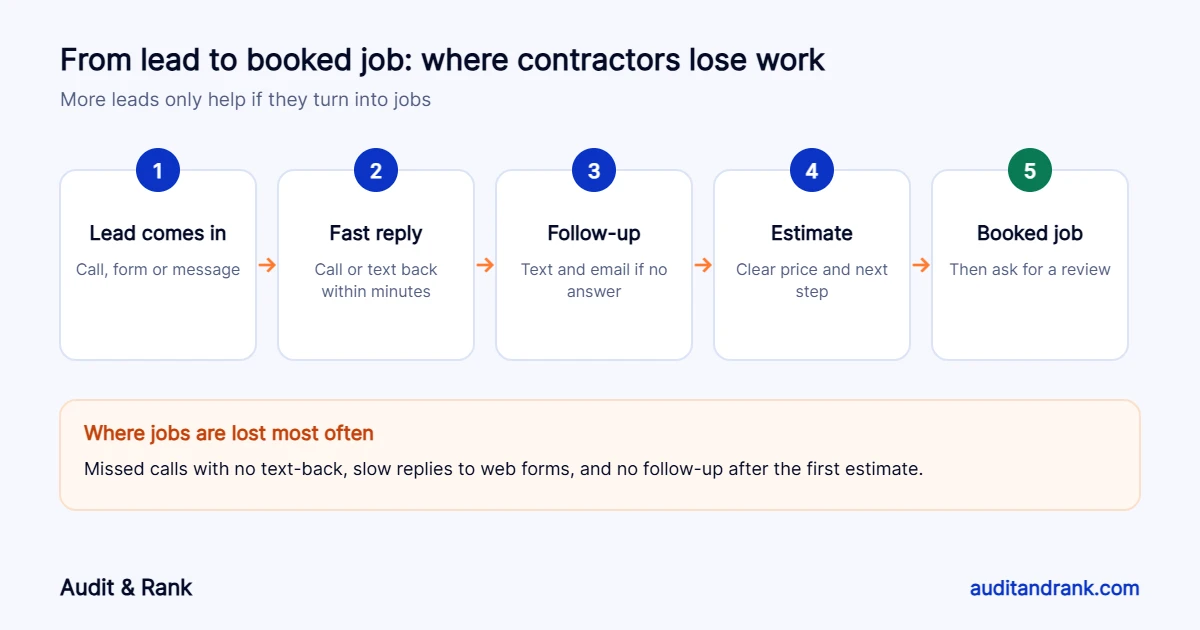
    Short answer: reply fast, follow up, and make it easy to say yes. Most lost jobs are lost after the lead arrives, so even the best lead generation for contractors fails without a good follow-up process.

    Lead generation for contractors diagram: the steps from a lead to a booked job and where jobs are lost
    More leads only help if they become jobs. Speed and follow-up decide most of them.
    1. Answer calls, or send an automatic text-back when you miss one while on a job.
    2. Reply to web forms within minutes during working hours.
    3. Follow up by text and email if the customer does not answer the first time.
    4. Send a clear estimate with a simple next step.
    5. After the job, ask for a Google review. It helps you win the next lead.

    How do I track cost per booked job?

    Short answer: divide what you spent on a source by the number of jobs it produced, not by the number of leads.

    Tracking your lead generation for contractors results is simple. Use a different tracking number or form for each source, or ask every new customer how they found you. Review the numbers monthly. A source with cheap leads but few jobs often costs more than one with expensive leads that close well.

    Want lead generation for contractors that brings calls only to you? Our home services SEO and Google Business Profile optimization services start with a free check of your profile and website.

    Frequently asked questions

    What is the best lead generation for contractors?

    There is no single best source. Exclusive sources such as local SEO, your Google Business Profile, Local Services Ads and referrals usually turn into jobs more often than shared leads, because you are not competing with other contractors for the same customer.

    Are shared contractor leads worth it?

    They can fill a slow week, but the same lead is often sent to several contractors, so you need to respond very fast and expect a lower close rate. Track cost per booked job, not cost per lead.

    What are exclusive home improvement leads?

    Leads that are sent only to you. They usually cost more per lead than shared leads, but they tend to close more often because the customer is not comparing several contractors who all called at once.

    How do contractors get leads without paying per lead?

    Build your Google Business Profile, a page for each main job on your website, reviews from every happy customer and referrals. These take longer to build but do not charge you for every lead.

    How long does local SEO take to bring contractor leads?

    Profile and website fixes can help within weeks. Steady growth in calls usually takes three to six months, depending on your trade, area and competition.

  • Local SEO for Home Service Businesses: The Complete Guide (2026)

    Local SEO for Home Service Businesses: The Complete Guide (2026)

    Local SEO for home services is how a plumbing, HVAC, roofing, electrical or cleaning company gets found when someone nearby needs help now. This guide answers the questions home service owners ask us most, in the order the work should be done: how Google decides who shows up, what to fix first, how to get more reviews, what it costs and how long it takes. Each section starts with a short answer, then the detail.

    Key points

    • Google ranks local results on three things: relevance, distance and prominence.
    • Your Google Business Profile and a page for each main job do most of the work.
    • Use one phone number everywhere, and track calls so you know what SEO brings in.
    • Ask every happy customer for a review, but never offer anything in return.
    • Local SEO for home services brings early wins in weeks and steady growth over three to six months.

    What is local SEO for home services?

    Short answer: local SEO for home services is the work that gets your business into the Google map pack and the local results when people nearby search for a service you offer, such as “emergency plumber” or “AC repair near me”.

    For home service companies the goal is not traffic. It is phone calls, form requests and booked jobs. That is why local SEO for trades focuses on three places: your Google Business Profile, your website and the trust signals around both, such as reviews and directory listings.

    Where do home service calls come from on Google?

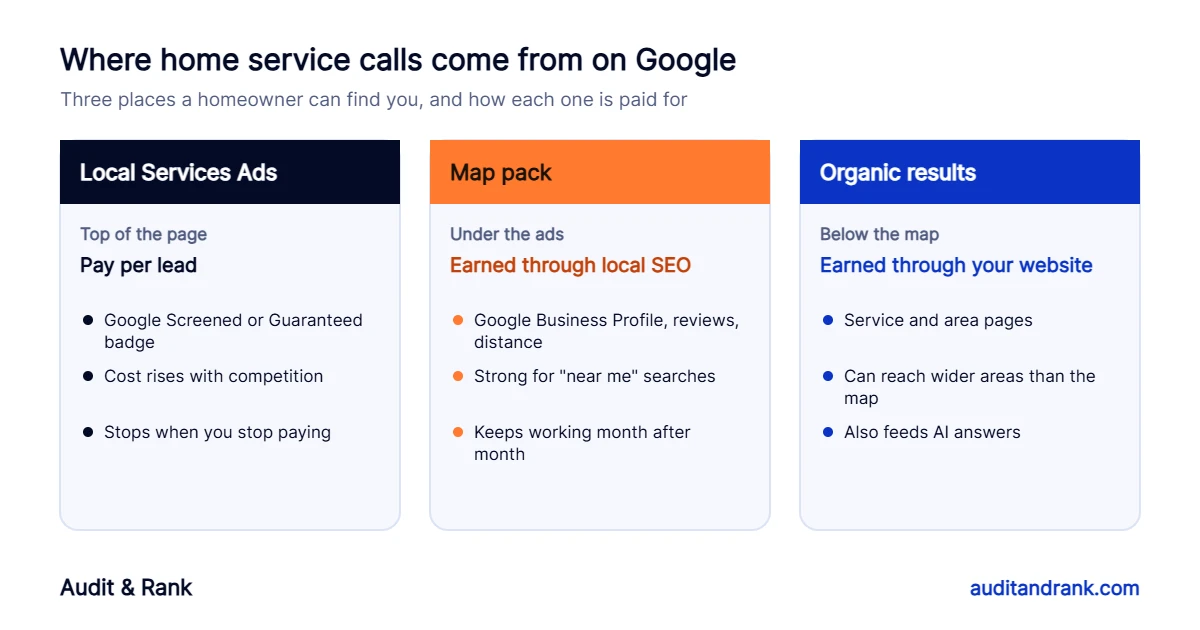
    Short answer: from three places on the results page: Local Services Ads at the top, the map pack below them, and the organic results below the map.

    Local SEO for home services diagram: Local Services Ads, the map pack and organic results, and how each brings calls
    Ads bring calls while you pay. The map pack and organic results keep working once you earn them.
    • Local Services Ads show a Google Screened or Google Guaranteed badge and charge per lead. They are fast, but the cost rises with competition and stops working the day you stop paying.
    • The map pack shows three businesses with a map. It is driven by your Google Business Profile, reviews and distance from the searcher.
    • Organic results are driven by your website. Good service and area pages can rank across a wider area than the map, and they also feed the answers AI tools give.

    How does Google decide which businesses show in the map pack?

    Short answer: Google says local results are based mainly on relevance, distance and prominence, so local SEO for home services starts with these three.

    • Relevance: how well your profile and website match the search. Your primary category, services and page content matter most.
    • Distance: how close the business is to the searcher or the area in the search. You cannot change it, which is why nobody ranks in the map everywhere.
    • Prominence: how well known and trusted the business is. Reviews, links, directory listings and mentions across the web all count.

    What should you fix first in local SEO for home services?

    Short answer: the Google Business Profile, the phone number and call tracking. These are quick, and everything else builds on them.

    1. Choose the most specific primary category, such as “Plumber” or “HVAC contractor”, and add real secondary categories.
    2. Add every main job to Services, with a short plain description.
    3. Set up as a service area business if customers do not visit you, and hide your home address.
    4. Use one main phone number on the profile, website and directories.
    5. Set up call and form tracking so you can see which calls come from Google.

    Our Google Business Profile optimization service covers this setup, and our free local SEO audit tool checks whether your website and profile phone numbers match.

    How should I set up my Google Business Profile?

    Short answer: use your real business name, the right categories, accurate service areas and hours, and real photos of your team, vans and jobs.

    • Name: exactly as on your van and invoices. Adding words like “Best Plumber Dallas” breaks Google’s rules and can get the profile suspended.
    • Service areas: the towns or zip codes you really serve, generally within about two hours’ drive of your base.
    • Description: up to 750 characters on who you help, your main jobs and your area. No links or offers.
    • Photos: real job photos, before and after shots, your team and vehicles. Add new ones every week.
    • Posts: recent jobs, seasonal tips and offers, a few times a month.

    Does my website still matter for local SEO for home services?

    Short answer: yes. Your website is what Google reads to understand your services, and it is where most visitors decide whether to call.

    Build one page for each main job, such as water heater repair, drain cleaning or roof replacement. Each page should say what the job involves, which areas you cover, what it roughly costs or how pricing works, and how fast you can come out, with a click-to-call button near the top. Add LocalBusiness schema with the same name, address and phone number as your profile.

    What about area pages?

    Area pages help you rank in towns where you have no office, but only if each page is genuinely about that area: jobs you have done there, reviews from customers there, travel times and local details. Pages copied from town to town with only the name changed can hurt more than they help.

    How do I get more Google reviews?

    Short answer: ask every satisfied customer, right after the job, with a short direct link, and reply to every review.

    • Create a short review link and a QR code for invoices and the van.
    • Send the link by text the same day, while the job is fresh.
    • Ask customers to mention the job and their town if they are happy to.
    • Never offer discounts or gifts for reviews, and never ask only happy customers through a filter. Both break Google’s rules.
    • Reply calmly to negative reviews and offer to fix the problem offline.

    Our review management service sets up this routine for you.

    Do citations and directories still matter?

    Short answer: yes, but quality and accuracy matter more than quantity.

    Make sure your name, address and phone number are correct on the main maps and data sources, and on the directories for your trade. Fix old addresses and phone numbers, and merge duplicate listings. Hundreds of low-quality listings add little. See local citation building.

    Should I use Local Services Ads, lead sites or local SEO?

    Short answer: use local SEO for home services as the base that keeps working, and paid options to fill gaps while it grows.

    Lead sites often sell the same lead to several companies, so you race to call first. Local Services Ads bring exclusive calls but charge for every lead. Local SEO costs a monthly fee instead of a per-lead fee, so the cost per call usually falls as rankings grow. Many companies keep a small ad budget for busy seasons and rely on local SEO the rest of the year.

    How long does local SEO for home services take, and what does it cost?

    Short answer: profile and website fixes can help within weeks; steady growth usually takes three to six months.

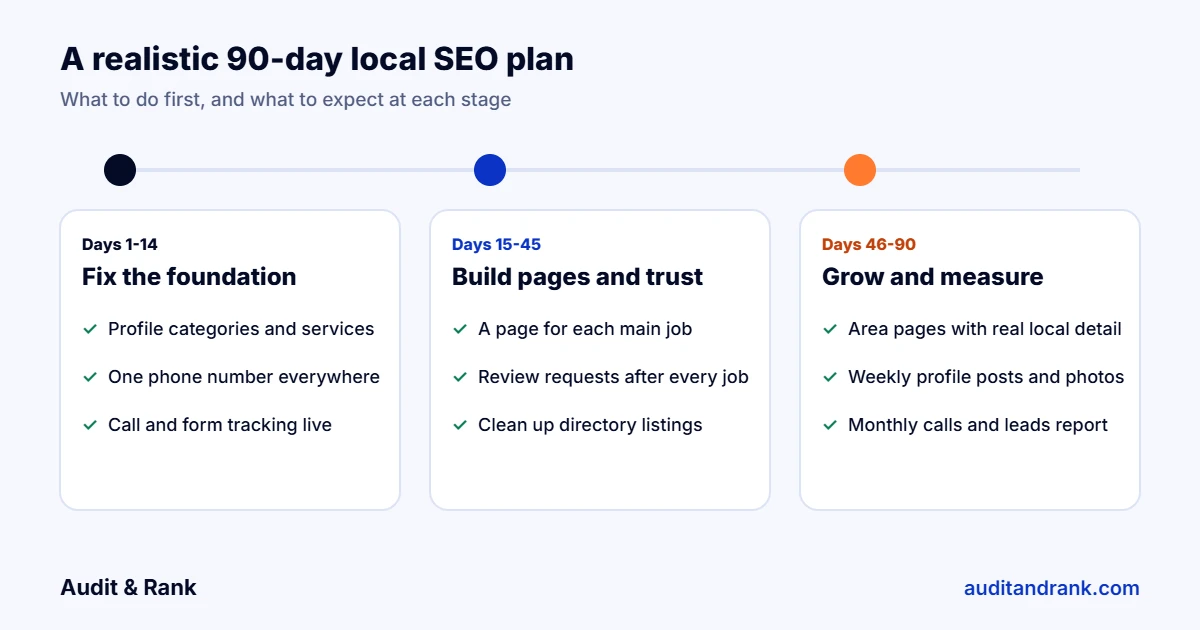
    Local SEO for home services timeline: a realistic 90-day plan
    A realistic first 90 days: fix the foundation, build pages and trust, then grow and measure.

    At Audit & Rank, Google Business Profile optimization starts from $150 one-time, and local SEO for one location starts from $300 a month, or from $600 a month for two or more locations, with no long contract. See our local SEO packages.

    What local SEO for home services mistakes cost the most calls?

    • A phone number on the website that differs from the one on Google, or is hard to tap on mobile.
    • One generic “services” page instead of a page for each profitable job.
    • Keyword-stuffed business names that get profiles suspended.
    • No job photos, so the business looks the same as every competitor.
    • Missed calls while crews are on site, with no text-back or follow-up.
    • No call tracking, so nobody knows whether SEO is working.

    Local SEO for home services checklist

    1. Primary and secondary categories match your real services.
    2. Every main job is listed in Services and has its own page.
    3. Service areas are accurate and your home address is hidden if needed.
    4. One phone number on the profile, website, schema and directories.
    5. Call and form tracking is live.
    6. Review link, QR code and text template are ready.
    7. Real photos are added every week.
    8. Directory listings are accurate and duplicates are merged.
    9. LocalBusiness schema matches the profile.
    10. A monthly report shows calls and leads, not only rankings.

    Trade-specific guides to local SEO for home services: local SEO for plumbers, HVAC, roofing companies, electricians and cleaning companies.

    Want us to check your local SEO for home services setup? Get a free local SEO check of your profile and website, usually within one working day.

    Frequently asked questions

    What is local SEO for home services?

    Local SEO helps plumbers, HVAC companies, roofers, electricians and cleaners appear in Google Maps and local results when people nearby search for their services, so they get more calls and booked jobs.

    How long does local SEO for home services take?

    Fixes to the Google Business Profile and website can help within a few weeks. Steady growth in calls usually takes three to six months, depending on competition and how much work the site needs.

    Is local SEO better than Local Services Ads?

    They do different jobs. Local Services Ads bring calls quickly but you pay for every lead. Local SEO takes longer but the calls keep coming without a cost per lead. Many companies use both.

    How much does local SEO cost for a home service business?

    At Audit & Rank, local SEO for one location starts from $300 a month and Google Business Profile optimization starts from $150 one-time. Prices vary with competition and the number of locations.

    Can I rank in towns where I have no office?

    Usually not in the map pack, because distance from the business matters. You can rank organic results there with useful area pages that include real local detail.

  • Google Business Profile for Law Firms: Setup, Categories and Mistakes to Avoid

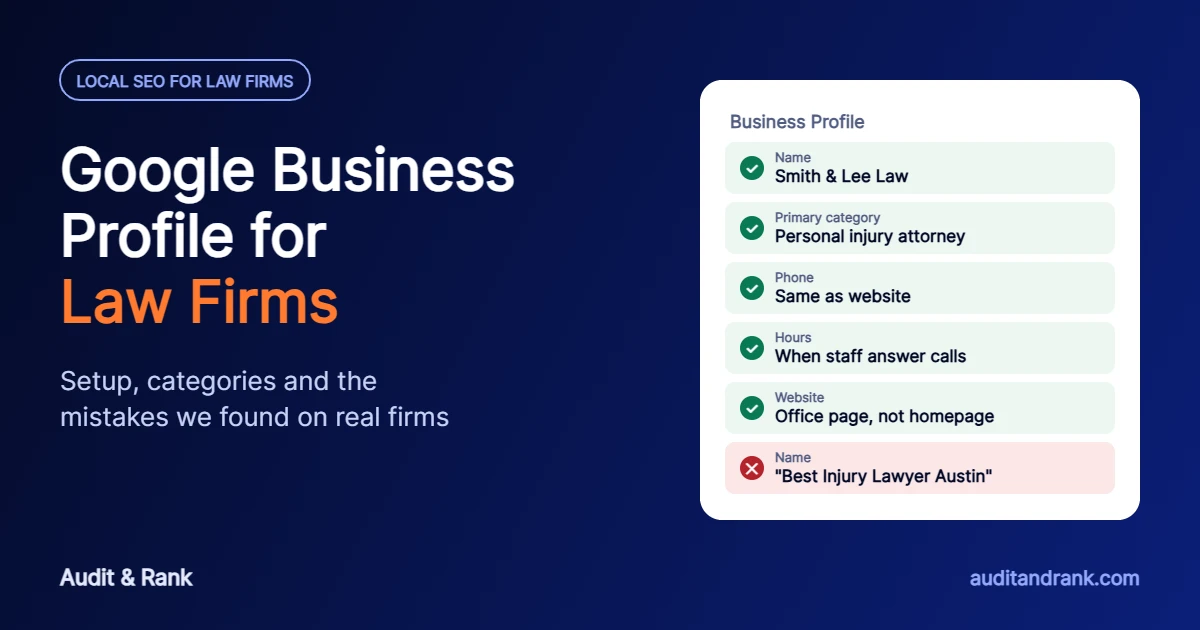
    Google Business Profile for Law Firms: Setup, Categories and Mistakes to Avoid

    Your Google Business Profile for law firms is the first thing a potential client sees, before the website and often before any ad. When someone searches “personal injury lawyer near me” or “divorce attorney in Austin”, the map pack decides which three firms get the call. This guide shows how to set up a Google Business Profile for law firms the way Google expects, which category to choose, and the mistakes we found when we checked more than 30 personal injury law firms in San Antonio in October 2026.

    Key points

    • A Google Business Profile for law firms must use your real firm name only. Adding keywords such as “Best Injury Lawyer” breaks Google’s rules and can get the profile suspended.
    • Choose the primary category from your main practice area, such as “Personal injury attorney”, and add other practice areas as secondary categories and services.
    • One profile per real, staffed office. Attorneys who meet clients can have their own profiles, named with their own name only.
    • The phone number must match your website. In our check of San Antonio firms, phone mismatches were the most common problem.
    • Link each profile to the matching office or attorney page, with the same name, address and phone number in the page’s schema.

    Why a Google Business Profile for law firms matters so much

    Legal searches are local and urgent. A person after a car accident or an arrest usually calls one of the first firms they see, and the map pack sits above the normal results for most of these searches. Clicks on legal keywords are also among the most expensive in Google Ads, so a Google Business Profile for law firms that ranks well brings calls that would otherwise cost a lot to buy. Reviews, photos and the answers Google’s AI gives about your firm all come from or around this profile.

    1. Use the firm’s real name, with no keywords

    Google’s guidelines say the profile name must match the name you use in the real world, on your signs, letterhead and website. Marketing words, practice areas and city names are not allowed unless they are truly part of the registered firm name. “Smith & Lee Law” is fine. “Smith & Lee Law | Best Car Accident Lawyer San Antonio” is not, and it can lead to suspension.

    Use the same name everywhere. In our San Antonio check, some firms used three different versions of their name across one homepage and its metadata. When Google is unsure which name belongs to which business, even branded searches can show the wrong result.

    2. Choose the right primary category for your law firm profile

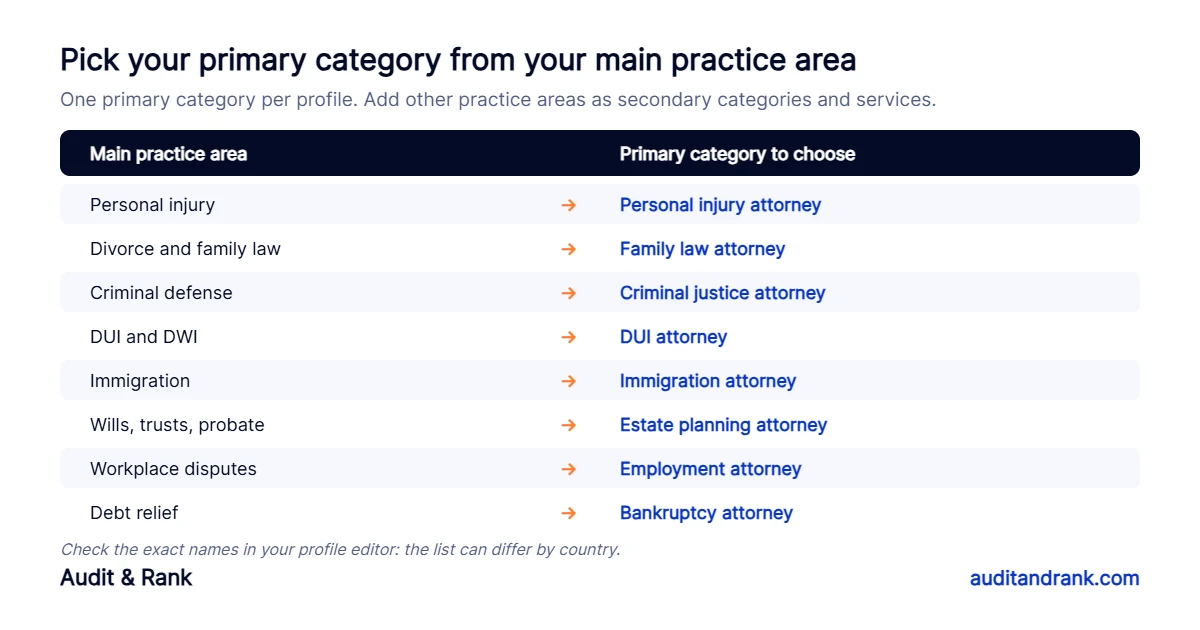
    The primary category is one of the strongest signals for which searches your Google Business Profile for law firms appears in. Choose the one that matches the work that brings in most of your revenue, then add other practice areas as secondary categories.

    Google Business Profile for law firms: which primary category to choose for each main legal practice area
    Match the primary category to your main practice area. Category names can differ by country.

    A general category such as “Law firm” or “Lawyer” is broader and usually weaker for specific searches. Use it as the primary category only if the firm truly has no main focus. Then add each practice area to the Services section with a short, plain description, because Google uses services to match profiles to searches too.

    3. One Google Business Profile for law firms per office, and the rules for attorney profiles

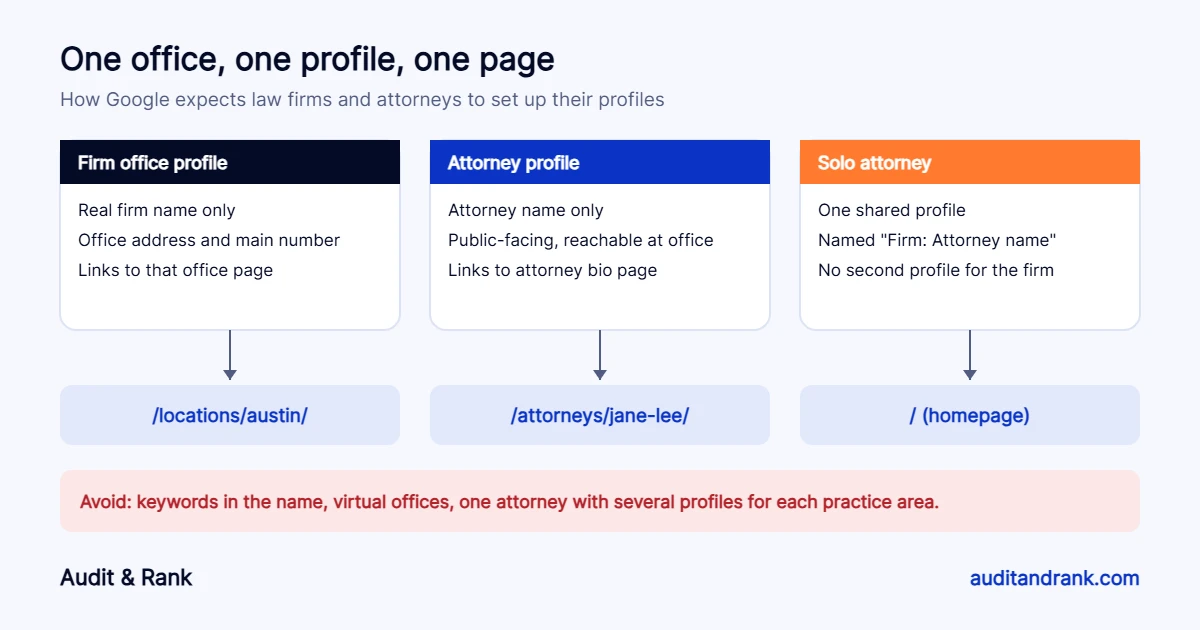
    Google treats lawyers as “individual practitioners”. Its guidelines allow:

    • One profile for each office that has a real address, signage and staff during its hours.
    • A separate profile for each public-facing attorney who can be contacted at that office. The profile uses the attorney’s name only, not the firm name or keywords.
    • One shared profile for a solo attorney who is the only lawyer at the firm, named in the format “Firm: Attorney name”.

    An attorney should not create several profiles for different practice areas, and support staff should not have profiles. A virtual office or a mail address where nobody works is not eligible, and a coworking space only qualifies if it has your signage and your own staff during business hours.

    Google Business Profile for law firms structure: office profiles, attorney profiles and solo attorney profiles, each linked to its own page
    Each profile links to the page that matches it: an office page, an attorney bio page, or the homepage for a solo attorney.

    4. Make the phone number match everywhere

    This was the most common problem in our check of San Antonio personal injury firms. The number on the Google profile did not appear on the homepage, or the homepage showed several different numbers, and in one case the visible number and the click-to-call link were different. Callers get confused, and Google sees less agreement between your profile and your site.

    Pick one main number per office. Put it on the profile, in the header and footer of the matching page, in the page’s LegalService schema and on your directory listings. If you use call tracking, Google allows a tracking number as the profile’s primary number as long as your main number is added as an additional number. Keep the main number on your website, in schema and on directories, so the business details still match everywhere.

    5. Link your Google Business Profile for law firms to the right page

    For a firm with several offices, link each profile to that office’s page, not the homepage. The office page should show the same name, address and phone number, a map, directions, the attorneys who work there and the practice areas handled there. Add LegalService schema to that page with the same details. A solo attorney or a firm with one office can link to the homepage.

    6. Complete every section that helps clients decide

    • Hours: list the hours when staff answer the phone and meet clients. If you only see people by appointment, follow Google’s guidance on appointment-only businesses instead of inventing hours.
    • Description: who you help, your main practice areas and the area you serve, in plain language. No links or promotional claims.
    • Photos: real photos of the office entrance, signage, reception and attorneys. These help people recognise the office when they arrive.
    • Attributes: languages spoken, wheelchair access, online appointments and any ownership attributes that apply.
    • Appointment link: point it to your intake form or consultation booking page.

    Google has removed the old Questions and Answers section from Business Profiles. Answers about your firm now increasingly come from Google’s AI, which reads your Google Business Profile for law firms, reviews, website and listings. Clear service descriptions and a helpful FAQ on your website matter more than ever.

    7. Reviews: ask the right way

    Reviews influence both rankings and which firm a person calls. Ask satisfied clients at the end of a matter, with a short direct link. Never offer anything in return, which breaks Google’s rules, and check your state bar’s advertising rules on testimonials, because they differ from state to state. Reply to every review calmly and without confirming any details of a client’s case, since even confirming that someone is a client can raise confidentiality issues.

    8. Verification and suspensions

    Google often asks law firms to verify with a short video showing the office signage, the street, and proof that you manage the business, such as unlocking the office or showing business documents. Keep these ready before you make big edits to your Google Business Profile for law firms. Changing the name, address or category often triggers re-verification, and a name stuffed with keywords is one of the most common reasons for suspension.

    Google Business Profile for law firms: quick checklist

    1. Name matches your signs and website, with no keywords.
    2. Primary category matches your main practice area.
    3. Practice areas added as secondary categories and services.
    4. One profile per staffed office, correct attorney profiles.
    5. Same phone number on the profile, website, schema and directories.
    6. Profile links to the matching office or attorney page.
    7. Hours, description, photos and attributes complete.
    8. A simple, rule-following routine to ask for reviews.

    To check whether your website matches your profile, run your homepage through our free local SEO audit tool and add the phone number from your Google profile. For the website problems we found most often, read 7 SEO problems we found on law firm websites.

    Want help with your Google Business Profile for law firms? Our local SEO for lawyers service fixes your profile, website and listings so your firm gets more case calls. Start with a free check.

    Frequently asked questions

    Can each attorney at a law firm have a Google Business Profile?

    Yes, if the attorney is public-facing and can be contacted at the office during its hours. The profile should use the attorney’s name only. Support staff should not have profiles.

    What is the best category for a Google Business Profile for law firms?

    The category that matches your main practice area, such as Personal injury attorney or Family law attorney. Use general categories like Law firm only if the firm has no main focus, and add other practice areas as secondary categories.

    Can a law firm use a virtual office for its Google profile?

    No. Google does not allow virtual offices or mail addresses where the firm does not work. A coworking space only qualifies if it has your signage and your own staff during business hours.

    Should a Google Business Profile for law firms link to the homepage?

    A firm with one office can link to the homepage. A firm with several offices should link each profile to the matching office page.

  • 7 SEO Problems We Found on Law Firm Websites (and How to Fix Them)

    7 SEO Problems We Found on Law Firm Websites (and How to Fix Them)

    In October 2026 we ran a law firm website SEO check on more than 30 personal injury firm sites in San Antonio, Texas, using the same checks we use in every SEO audit. These are established firms. Many have hundreds of five-star Google reviews. Yet almost every site had at least one problem that quietly holds back its rankings, and most had several.

    We are not naming any firm here. The point is the pattern: the same seven law firm website SEO issues came up again and again. If you run a law firm, a clinic or any local business, there is a good chance your site has some of them too.

    Key findings

    • The most common lead leak was a phone number on the website that did not match the Google Business Profile, or several different numbers on one homepage.
    • Very few firms used LegalService or LocalBusiness schema, even though most already had an SEO plugin installed.
    • Several sites had test pages, staging copies or duplicate URLs showing in search results.
    • Many homepage titles were close to 100 characters and stuffed with keywords, so Google cut them off.
    • Most of these fixes take hours, not months, and protect rankings the firm has already paid for.
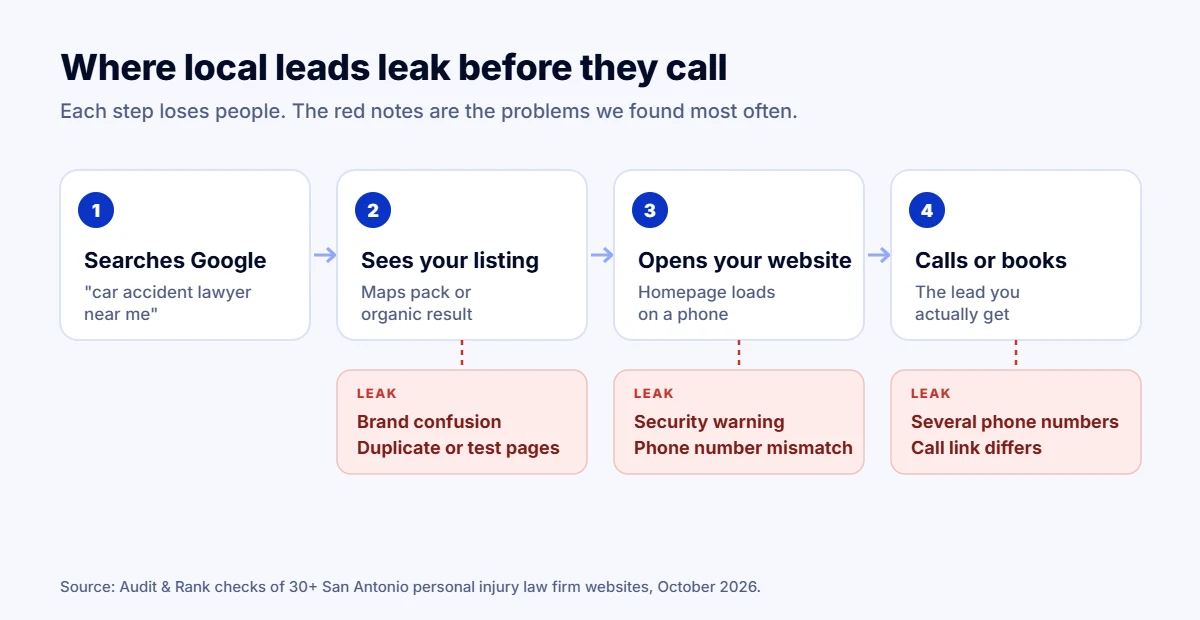
    Diagram: where local leads leak between a Google search and a phone call, with the leaks found on law firm websites
    Where local leads leak between a Google search and a phone call.

    1. Title tags stuffed with keywords

    Several homepages had titles close to 100 characters, repeating phrases like “San Antonio personal injury lawyer” two or three times. Google shows roughly the first 60 characters, so the rest is cut off, and repetition reads as spam to both people and search engines.

    Fix: one clear title under 60 characters with the main service, the city and the firm name. For example: “Car Accident Lawyer in San Antonio | Firm Name”.

    2. Meta descriptions that are too long or full of typos

    We found descriptions from 180 to more than 450 characters, and one with spelling mistakes in the first sentence. The meta description is often the first thing a potential client reads in Google. A cut-off or misspelled snippet lowers clicks, even when the firm ranks well.

    Fix: 140 to 160 characters, written like an ad: who you help, what makes you different, and a reason to call today.

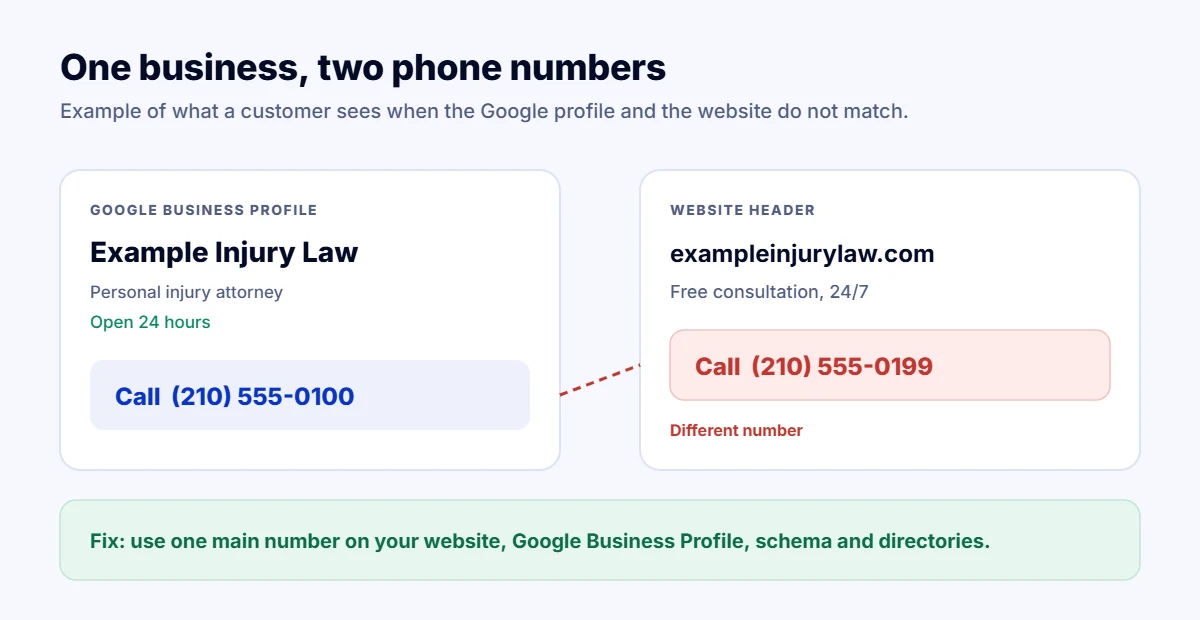
    3. The phone number on Google does not match the website

    This was one of the most common problems. The number on the Google Business Profile did not appear on the homepage, or the homepage showed three different numbers. In one case the visible number and the click-to-call number were different. Google uses name, address and phone (NAP) consistency as a trust signal for the map pack, and callers get confused too.

    Fix: pick one main number per office and use it everywhere: website header and footer, Google Business Profile, directories and social profiles. If you use call tracking, keep the main number in your schema and listings.

    Example of a law firm Google Business Profile phone number that does not match the number on its website
    Example: the number on Google does not match the number on the website.

    4. No local business schema

    Most sites had some structured data, usually added by an SEO plugin, but very few described the firm as a LegalService or LocalBusiness with its address, phone, opening hours and practice areas. Without it, Google has to guess what the business is and where it operates. Schema is also one of the signals AI search tools use to understand a business.

    Fix: add LegalService (or the right LocalBusiness type) schema on the homepage and each office page, with the same NAP details as your Google profile.

    5. Duplicate, test and staging pages showing in search

    We found a test page left live and indexed, ugly ?p=12345 versions of pages appearing in search results, URLs ending in “-3” from pages that were copied several times, and even a full staging copy of a firm’s website appearing in results for its main keyword. Each of these splits ranking signals between two or more versions of the same content.

    Fix: delete or noindex test pages, password-protect staging sites, set correct canonical tags, and redirect old duplicates to the main page. Then check the “Pages” report in Google Search Console.

    6. Unfinished details: placeholder links and missing alt text

    Many homepages had five or more menu or footer links pointing to “#”, meaning they go nowhere. Others had 30 to 40 percent of images with no alt text. One even had pinch-zoom disabled on mobile, which hurts accessibility. None of these alone will sink a site, but together they tell Google and visitors that the site is not well maintained.

    Fix: crawl your site once a quarter, fix every empty link, describe every meaningful image, and let mobile users zoom.

    7. Brand confusion

    Some firms used three different names across the same homepage and their metadata. In one case, searching for an attorney’s own name returned another law firm’s profile page about him instead of his own firm’s website. When Google is unsure which name belongs to which business, branded searches, the easiest searches to win, go to someone else.

    Fix: one official firm name everywhere, an About page and attorney pages on your own domain, and Organization schema with links to your official social profiles.

    Bonus: problems we found on older listings

    • Broken SSL certificates, so browsers show a security warning before the page even loads.
    • Dead domains still listed in online directories, sending potential clients nowhere.
    • Homepages returning a 404 error while the business is still active.
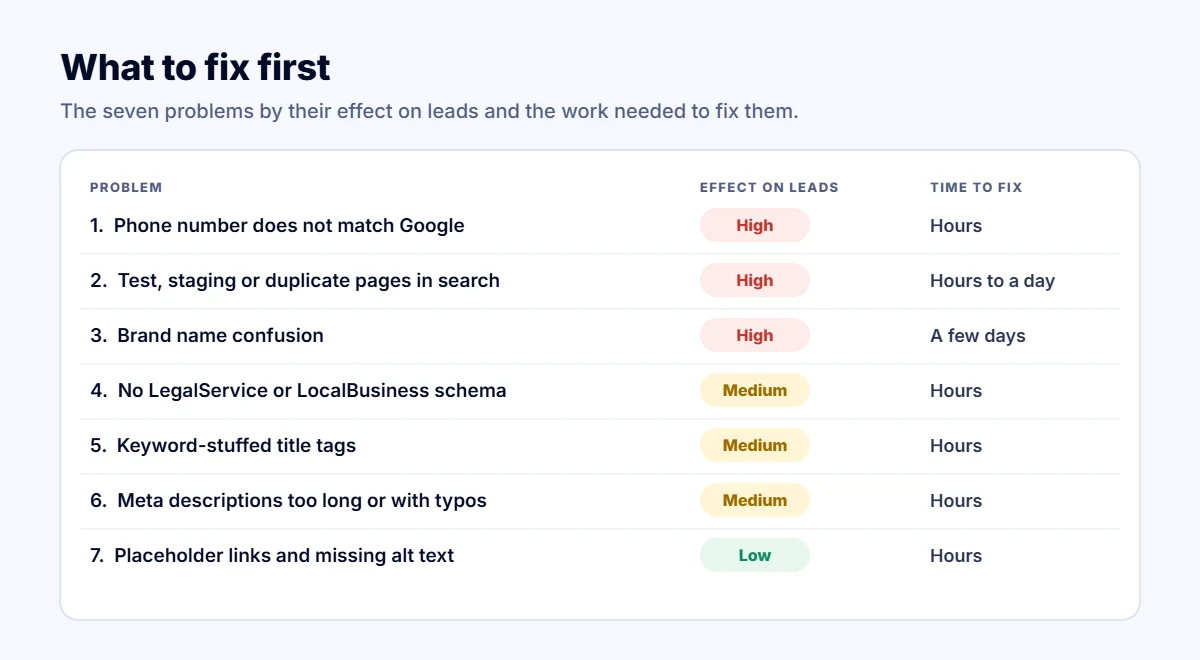
    Table of seven law firm website SEO problems ranked by effect on leads and time to fix
    Fix the high-impact problems first. Most take hours, not months.

    Why this matters more for law firms

    Law firm website SEO is one of the fastest ways to protect those rankings, and a single personal injury case can be worth tens of thousands of dollars in fees. Losing a few positions in the map pack or the top organic results means losing calls to the firm one spot above. Most of the fixes above take hours, not months, and they protect rankings you have already paid for with content, links and reviews.

    Check your own site

    1. Search your firm name on Google and check that your own site and Google Business Profile come first.
    2. Compare the phone number on your Google profile with your homepage, or run our free Lead Leak Checker to spot it automatically.
    3. Open Google Search Console, go to Pages, and look for test, staging or duplicate URLs.
    4. Export your Performance report and run it through our free Search Console Analyzer to see which pages are losing clicks.

    How we did this research

    In October 2026 we listed personal injury law firms in San Antonio from Google Maps and OpenStreetMap, then checked each firm’s homepage, as part of this law firm website SEO review, with the same automated checks our Lead Leak Checker uses: security, mobile settings, phone numbers, schema, titles, descriptions, headings and sitemaps. We then reviewed the sites by hand and looked at how each firm appeared in search results. We do not name any firm, and the problems above are patterns, not scores of individual businesses.

    Frequently asked questions

    What is the most common SEO problem on law firm websites?

    In our checks it was inconsistent phone numbers: the number on the Google Business Profile did not appear on the website, or the homepage showed several different numbers. This splits calls and weakens map pack rankings.

    Does a law firm need schema markup?

    Yes. LegalService or LocalBusiness schema tells Google and AI search tools what the firm does, where it is, its hours and its phone number. It should match the Google Business Profile exactly.

    How long do these fixes take?

    Most of the issues in this article take a few hours to fix. Ranking and lead improvements usually show within a few weeks, once Google recrawls the pages.

    How can I check my own law firm website?

    Run your homepage through our free Lead Leak Checker. Add the phone number from your Google Business Profile to check whether it matches your site.

    Want us to handle your law firm website SEO? Send your website and we will reply with a free quick check and a prioritised fix list, usually within one working day. Get a free SEO audit.

Chat with us