Your Google Business Profile for law firms is the first thing a potential client sees, before the website and often before any ad. When someone searches “personal injury lawyer near me” or “divorce attorney in Austin”, the map pack decides which three firms get the call. This guide shows how to set up a Google Business Profile for law firms the way Google expects, which category to choose, and the mistakes we found when we checked more than 30 personal injury law firms in San Antonio in October 2026.
Key points
- A Google Business Profile for law firms must use your real firm name only. Adding keywords such as “Best Injury Lawyer” breaks Google’s rules and can get the profile suspended.
- Choose the primary category from your main practice area, such as “Personal injury attorney”, and add other practice areas as secondary categories and services.
- One profile per real, staffed office. Attorneys who meet clients can have their own profiles, named with their own name only.
- The phone number must match your website. In our check of San Antonio firms, phone mismatches were the most common problem.
- Link each profile to the matching office or attorney page, with the same name, address and phone number in the page’s schema.
Why a Google Business Profile for law firms matters so much
Legal searches are local and urgent. A person after a car accident or an arrest usually calls one of the first firms they see, and the map pack sits above the normal results for most of these searches. Clicks on legal keywords are also among the most expensive in Google Ads, so a Google Business Profile for law firms that ranks well brings calls that would otherwise cost a lot to buy. Reviews, photos and the answers Google’s AI gives about your firm all come from or around this profile.
1. Use the firm’s real name, with no keywords
Google’s guidelines say the profile name must match the name you use in the real world, on your signs, letterhead and website. Marketing words, practice areas and city names are not allowed unless they are truly part of the registered firm name. “Smith & Lee Law” is fine. “Smith & Lee Law | Best Car Accident Lawyer San Antonio” is not, and it can lead to suspension.
Use the same name everywhere. In our San Antonio check, some firms used three different versions of their name across one homepage and its metadata. When Google is unsure which name belongs to which business, even branded searches can show the wrong result.
2. Choose the right primary category for your law firm profile
The primary category is one of the strongest signals for which searches your Google Business Profile for law firms appears in. Choose the one that matches the work that brings in most of your revenue, then add other practice areas as secondary categories.
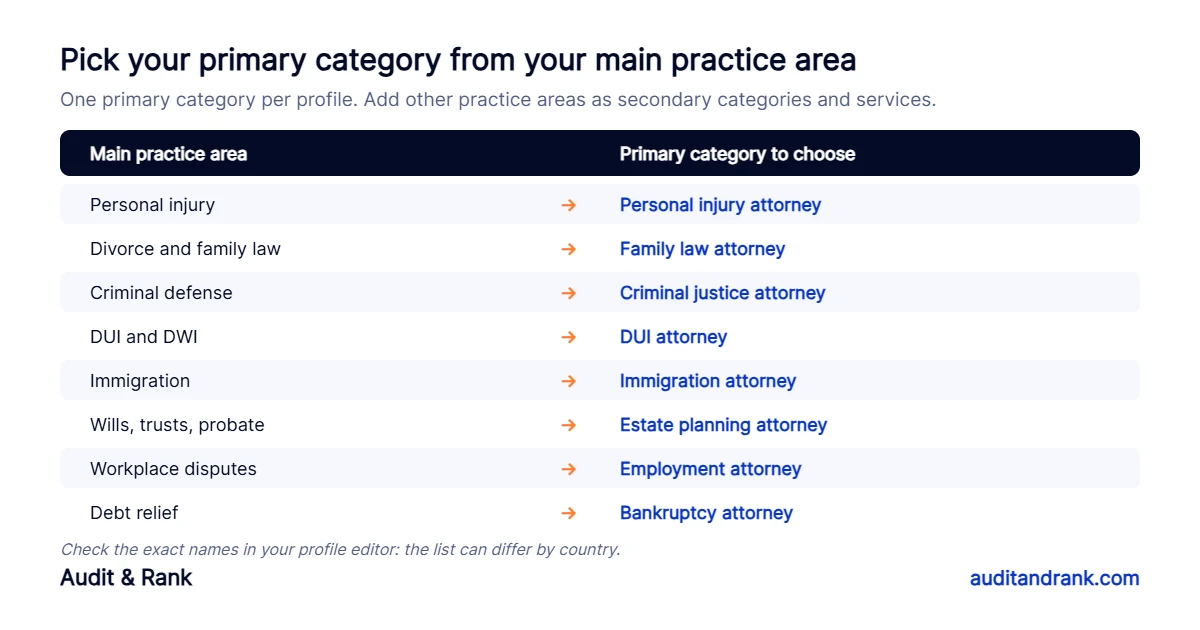
A general category such as “Law firm” or “Lawyer” is broader and usually weaker for specific searches. Use it as the primary category only if the firm truly has no main focus. Then add each practice area to the Services section with a short, plain description, because Google uses services to match profiles to searches too.
3. One Google Business Profile for law firms per office, and the rules for attorney profiles
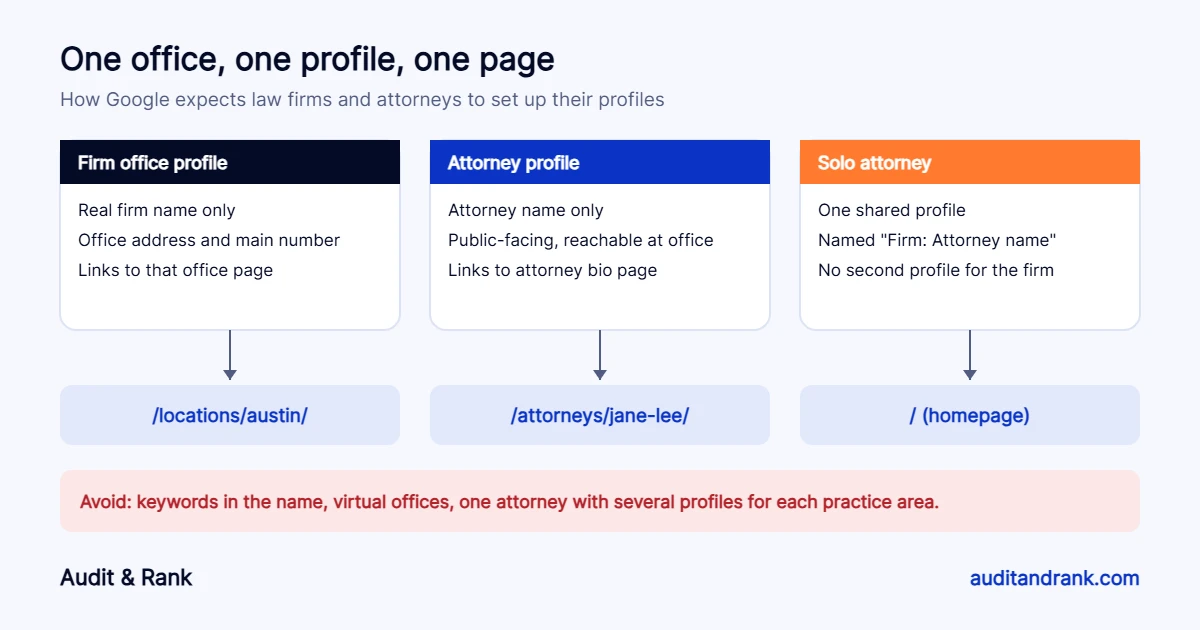
Google treats lawyers as “individual practitioners”. Its guidelines allow:
- One profile for each office that has a real address, signage and staff during its hours.
- A separate profile for each public-facing attorney who can be contacted at that office. The profile uses the attorney’s name only, not the firm name or keywords.
- One shared profile for a solo attorney who is the only lawyer at the firm, named in the format “Firm: Attorney name”.
An attorney should not create several profiles for different practice areas, and support staff should not have profiles. A virtual office or a mail address where nobody works is not eligible, and a coworking space only qualifies if it has your signage and your own staff during business hours.
4. Make the phone number match everywhere
This was the most common problem in our check of San Antonio personal injury firms. The number on the Google profile did not appear on the homepage, or the homepage showed several different numbers, and in one case the visible number and the click-to-call link were different. Callers get confused, and Google sees less agreement between your profile and your site.
Pick one main number per office. Put it on the profile, in the header and footer of the matching page, in the page’s LegalService schema and on your directory listings. If you use call tracking, Google allows a tracking number as the profile’s primary number as long as your main number is added as an additional number. Keep the main number on your website, in schema and on directories, so the business details still match everywhere.
5. Link your Google Business Profile for law firms to the right page
For a firm with several offices, link each profile to that office’s page, not the homepage. The office page should show the same name, address and phone number, a map, directions, the attorneys who work there and the practice areas handled there. Add LegalService schema to that page with the same details. A solo attorney or a firm with one office can link to the homepage.
6. Complete every section that helps clients decide
- Hours: list the hours when staff answer the phone and meet clients. If you only see people by appointment, follow Google’s guidance on appointment-only businesses instead of inventing hours.
- Description: who you help, your main practice areas and the area you serve, in plain language. No links or promotional claims.
- Photos: real photos of the office entrance, signage, reception and attorneys. These help people recognise the office when they arrive.
- Attributes: languages spoken, wheelchair access, online appointments and any ownership attributes that apply.
- Appointment link: point it to your intake form or consultation booking page.
Google has removed the old Questions and Answers section from Business Profiles. Answers about your firm now increasingly come from Google’s AI, which reads your Google Business Profile for law firms, reviews, website and listings. Clear service descriptions and a helpful FAQ on your website matter more than ever.
7. Reviews: ask the right way
Reviews influence both rankings and which firm a person calls. Ask satisfied clients at the end of a matter, with a short direct link. Never offer anything in return, which breaks Google’s rules, and check your state bar’s advertising rules on testimonials, because they differ from state to state. Reply to every review calmly and without confirming any details of a client’s case, since even confirming that someone is a client can raise confidentiality issues.
8. Verification and suspensions
Google often asks law firms to verify with a short video showing the office signage, the street, and proof that you manage the business, such as unlocking the office or showing business documents. Keep these ready before you make big edits to your Google Business Profile for law firms. Changing the name, address or category often triggers re-verification, and a name stuffed with keywords is one of the most common reasons for suspension.
Google Business Profile for law firms: quick checklist
- Name matches your signs and website, with no keywords.
- Primary category matches your main practice area.
- Practice areas added as secondary categories and services.
- One profile per staffed office, correct attorney profiles.
- Same phone number on the profile, website, schema and directories.
- Profile links to the matching office or attorney page.
- Hours, description, photos and attributes complete.
- A simple, rule-following routine to ask for reviews.
To check whether your website matches your profile, run your homepage through our free local SEO audit tool and add the phone number from your Google profile. For the website problems we found most often, read 7 SEO problems we found on law firm websites.
Want help with your Google Business Profile for law firms? Our local SEO for lawyers service fixes your profile, website and listings so your firm gets more case calls. Start with a free check.
Frequently asked questions
Can each attorney at a law firm have a Google Business Profile?
Yes, if the attorney is public-facing and can be contacted at the office during its hours. The profile should use the attorney’s name only. Support staff should not have profiles.
What is the best category for a Google Business Profile for law firms?
The category that matches your main practice area, such as Personal injury attorney or Family law attorney. Use general categories like Law firm only if the firm has no main focus, and add other practice areas as secondary categories.
Can a law firm use a virtual office for its Google profile?
No. Google does not allow virtual offices or mail addresses where the firm does not work. A coworking space only qualifies if it has your signage and your own staff during business hours.
Should a Google Business Profile for law firms link to the homepage?
A firm with one office can link to the homepage. A firm with several offices should link each profile to the matching office page.